

Claude Design – artistic impression. Image credit: Anthropic
Key Takeaways
- Claude Design launched April 17, 2026 from Anthropic Labs, powered by Claude Opus 4.7.
- Available to Pro, Max, Team, and Enterprise plan subscribers (off by default for Enterprise).
- Supports animated videos, slide decks, landing pages, mobile app prototypes, wireframes, marketing assets, and design systems.
- Uses a two-panel layout: chat on the left, live canvas on the right.
- Inherits your organization’s design system automatically—brand colors, fonts, and components apply without setup.
- Accepts prompts, screenshots, documents (DOCX, PPTX, XLSX), codebases, and web-captured elements as input.
- Exports to PDF, PPTX, Canva, standalone HTML, ZIP folders, or hands off to Claude Code.
- Supports organization-scoped sharing with view, comment, and edit permissions.
- Still experimental—known quirks include occasional comment loss, save errors in compact view, and lag on very large repositories.
Claude Design is Anthropic’s new AI-powered design tool, launched on April 17, 2026 as part of Anthropic Labs. It lets you create interactive prototypes, slide decks, landing pages, mobile app mockups, marketing collateral, and full design systems by describing what you want in plain language—no design background required.
The tool is powered by Claude Opus 4.7, Anthropic’s most capable vision model, and is available in research preview to Pro, Max, Team, and Enterprise subscribers.
The workflow is simple: you type a prompt, Claude generates a working design on a canvas, and you refine it through chat messages, inline comments, direct edits, or custom sliders until it matches what you had in mind.
Because every output is generated as code underneath, designs can be exported to formats ranging from PDF and PPTX to standalone HTML, or handed off directly to Claude Code for engineering implementation.
What Claude Design Does
Claude Design sits alongside Claude Code and Claude Cowork as part of Anthropic’s broader push into knowledge work. The common thread across all three: code underpins everything. Videos, slides, websites, and apps are all just code when you strip them down, and Claude generates that code from natural language.
That positioning puts Claude Design in direct competition with incumbents like Figma and Microsoft PowerPoint, plus AI-first rivals such as Replit, Lovable, and Gamma. The pitch to users is that exploration becomes cheap. Even seasoned designers typically ration how many directions they prototype because there isn’t time for a dozen versions. Claude Design removes that constraint, and for founders, product managers, and marketers without design training, it offers a route to producing visual work that previously required hiring out or learning a tool like Figma from scratch.
Who Is It For and What Can You Build?
The intended audience is broad. Teams have already been using Claude Design for several distinct workflows:
| Use Case | Typical User | What Claude Produces |
|---|---|---|
| Realistic prototypes | Designers | Shareable interactive prototypes from static mockups |
| Product wireframes | Product Managers | Feature flow sketches, handed off to Claude Code or designers |
| Design explorations | Designers | Multiple directional variations to compare |
| Pitch decks | Founders, Account Executives | On-brand presentations, exportable to PPTX or Canva |
| Marketing collateral | Marketers | Landing pages, social assets, campaign visuals |
| Frontier prototypes | Anyone | Code-powered builds with voice, video, 3D, shaders, built-in AI |
A hands-on walkthrough by one reviewer tested five scenarios back to back: an animated video generated from a blog post, a slide deck, a recreated landing page, a 3D rotating globe with text particle effects, and a one-shot mobile fitness app with play-testing built in. The reviewer also generated an Apple Liquid Glass-style design system. Total time: roughly 16 minutes.
How the Interface Works
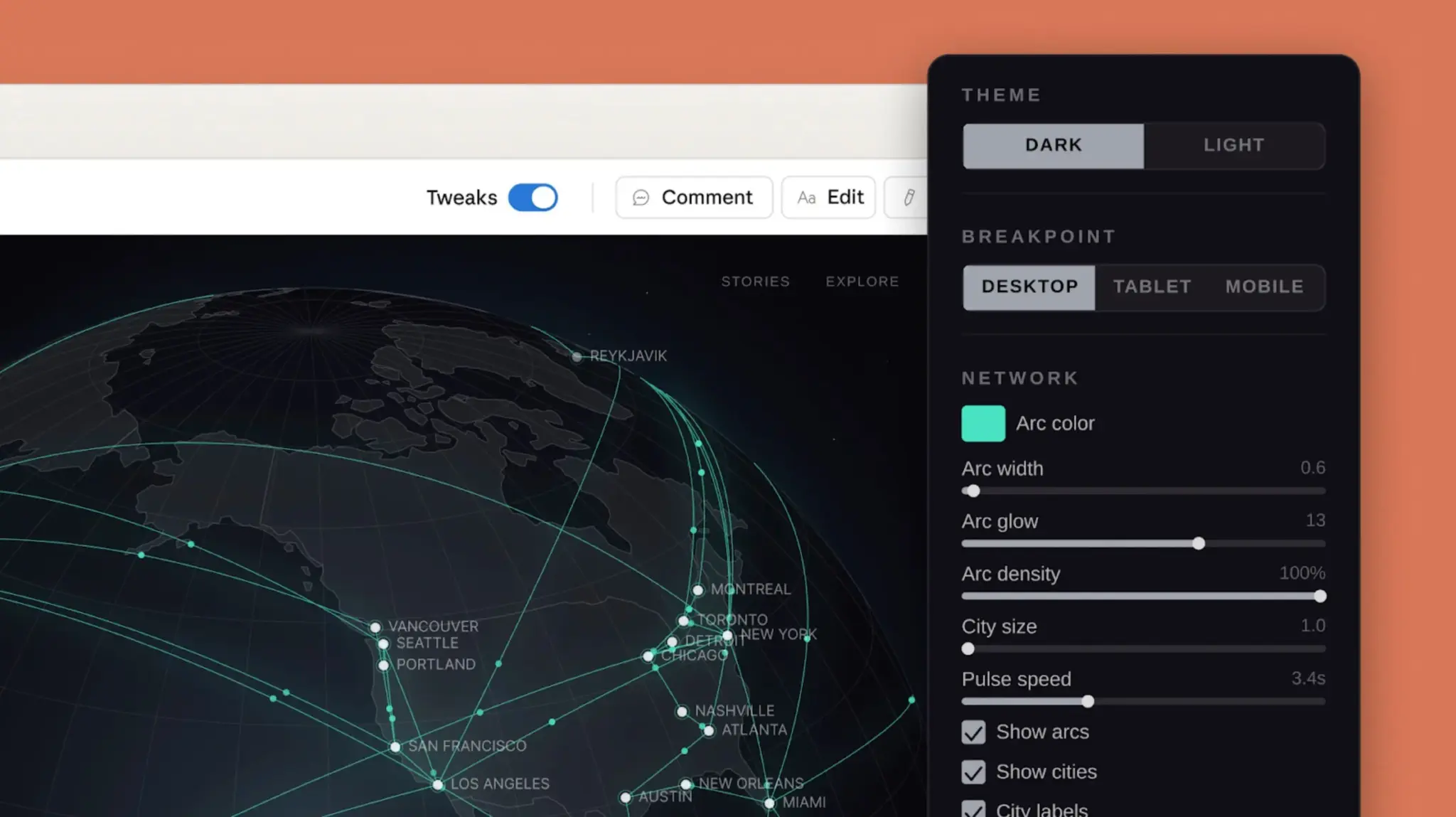
Designing with Claude Design. Image credit: Anthropic
The screen is split in two. On the left is a chat window where you describe what you want. On the right is a live canvas where the output appears. You type a prompt, Claude asks clarifying questions (length, tone, aspect ratio, audience, and similar), then builds a first version. From there, refinement is conversational.
When you first create a project, it automatically inherits your organization’s design system. If your team’s design lead has already set that up, you don’t upload brand assets or configure anything. Brand colors, typography, and component patterns are already in place. During onboarding for a new team, Claude builds the design system by reading your codebase and design files. Teams can maintain more than one system and refine them over time.
Feeding Claude Context
Output quality depends heavily on what you give Claude to work with. You can attach reference material at any point during a project:
- Screenshots and images of existing designs, competitor products, or wireframes—useful for “make it look like this” requests.
- Existing slide decks or documents whose style you want to replicate (DOCX, PPTX, XLSX all accepted).
- Codebases or design files—linking a repository gives Claude your existing components, architecture, and styling patterns, which makes prototypes closer to production-ready.
- Web captures—a built-in tool grabs elements directly from your live website, so prototypes can look like the actual product.
Writing Prompts That Work
You don’t need to be a designer to get usable results, but specificity matters. A good prompt names four things: the goal (what you’re building), the layout (how things should be arranged), the content (what information appears), and the audience (who will use it). If Claude needs more information, it asks.
Examples of prompts Anthropic cites as effective:
“Create a dashboard showing monthly revenue with filters for region and product line.”
“Design a mobile app onboarding flow with 4 screens that walks users through our core features.”
“Build a landing page for our new API product with a hero section, code examples, and pricing.”
“Create a form for collecting customer feedback with conditional questions based on category.”
“Design an internal tool for our ops team to review and approve content submissions.”
Iterating: Chat vs. Inline Comments
The first generation is a starting point. Where Claude Design actually earns its keep is in the back-and-forth.
Chat is best for broad, structural changes—”make the color scheme darker and more minimal,” “rearrange the dashboard so metrics are in the top row,” “add a settings panel on the right side,” or “show me 2–3 alternative layouts.” You can also ask Claude to explain its decisions, suggest improvements, or review the design for accessibility.
Inline comments let you click directly on an element and request a targeted change. This is faster than describing a location in prose. Good inline comments are narrow and specific: “make this button padding larger,” “change this to a dropdown instead of radio buttons,” “use the primary brand color here,” “make this section collapsible.”
The rough rule: use inline comments for component-level adjustments, and use chat for anything structural, aesthetic, or explanatory.
There is one known hiccup. Inline comments occasionally disappear before Claude reads them. If that happens, Anthropic’s documented workaround is to paste the comment text directly into the chat instead.
Managing Versions
If you want to explore a different direction without abandoning your current work, tell Claude something like: “Save what we have and try a completely different approach.” Claude will save the current state and confirm where it’s saved, letting you reference earlier iterations later in the conversation.
Exporting and Sharing
When a design is ready, you have several ways to get it out of Claude Design:
| Export Option | Best For |
|---|---|
| Download as .zip | Full project archive |
| Export as PDF | Static review or stakeholder feedback |
| Export as PPTX | Reusable presentation files |
| Send to Canva | Further editing in Canva |
| Export as standalone HTML | Self-contained web previews |
| Handoff to Claude Code | Engineering implementation |
| Send to local coding agent | Local development workflows |
| Send to Claude Code Web | Cloud-based Claude Code sessions |
Sharing within your organization works through a shareable link with three permission tiers: view-only, comment, or edit access. Edit access allows colleagues to modify the design and chat with Claude together in a group conversation.
One caveat worth noting from hands-on testing: at launch, animated video output cannot be exported as a video file directly. Reviewers have resorted to screen recording as a workaround.
Tips for Getting Better Results
Anthropic’s own guidance and user reports converge on the same handful of practices. Start simple—get the core layout and content right, then layer in interactions, edge cases, and polish. Be concrete in feedback; “this doesn’t look right” gives Claude nothing to act on, while “tighten the spacing between form fields to 8px” does. If you know a component exists in your design system, name it directly: “Use the Primary Button component” or “Apply the Card layout pattern.” Decide early whether your design needs to work across mobile, tablet, and desktop, and say so. When you’re unsure about a direction, ask for two or three variations—comparing alternatives is faster than guessing. And treat Claude as a design collaborator, not just a generator: ask for accessibility reviews, contrast ratio checks, and hierarchy feedback.
Known Limitations at Launch
Because Claude Design is an experimental preview, a few rough edges remain. Inline comments can vanish before Claude processes them (paste into chat as a workaround). The compact layout mode can trigger save errors, in which case switching to full view and retrying usually works. Linking very large repositories may cause lag or browser problems—the recommended fix is to link specific subdirectories rather than entire monorepos. And if you hit a “chat upstream error,” starting a new chat tab within the same project tends to resolve it.
Pricing and Availability
Claude Design is included in Claude Pro, Max, Team, and Enterprise plans at no extra cost, though usage contributes to subscription limits. The capability is off by default for Enterprise plans, so administrators need to enable it. Anthropic has said it plans to make building integrations with Claude Design easier over the coming weeks, connecting it to more tools teams already use.
Final Perspective
Claude Design isn’t a Figma replacement for specialist work, at least not yet. Designers will still reach for dedicated tools for pixel-perfect production. But for the enormous middle ground—pitch decks that need to look professional, prototypes that need stakeholder buy-in, marketing pages that need to ship this week, internal tools no one has time to build—it collapses hours of work into minutes. The slide decks can feel static compared to what Claude does with animation and interactivity, but the landing page and app prototype capabilities are genuinely strong. For anyone who has ever needed visual output without the budget, time, or skills to produce it, this is worth setting up an account to try.
If you are interested in this topic, we suggest you check our articles:
- How Does Perplexity Compare Against Other GenAI Models?
- How Similar Is Claude Design to Figma and Canva?
Written by Alius Noreika
