
Creating a presentation is a common task for work, education, and speech. But the traditional way of making slides takes a lot of time and effort. Many people spend more time fixing design problems than building real ideas.
WorkPPT offers a new way to do this task. This article explains why WorkPPT is a better choice than making slides by hand, and how it changes the entire workflow of creating presentations.
1. Why Manual PPT Work Slows You Down
The Content Trap
First, you must outline your presentation. You start with a blank deck. You spend time creating titles and writing the text for each slide. If you have a long document, you have to read it and manually cut the key points. This process is slow and maybe the results are not what you expect.
The Design Headache
Second, you must be a designer. You waste hours on small, repetitive tasks:
- Searching for Templates: You look for a design, but it rarely fits your content perfectly, so you have to change it line by line.
- Alignment: You manually drag and drop pictures and text boxes. You try to make them line up exactly, which takes huge effort and is still often imperfect.
- Visuals: You have to find, download, and size your own images, hoping they match the design.
This design work can take up most of your time, slowing down your entire project workflow.
2. What WorkPPT AI Presentation Maker Does Differently
WorkPPT AI Presentation Maker speeds up the entire process. Instead of starting from design, it starts from your content. It uses AI to analyze your input and turn it into complete and professional slides.
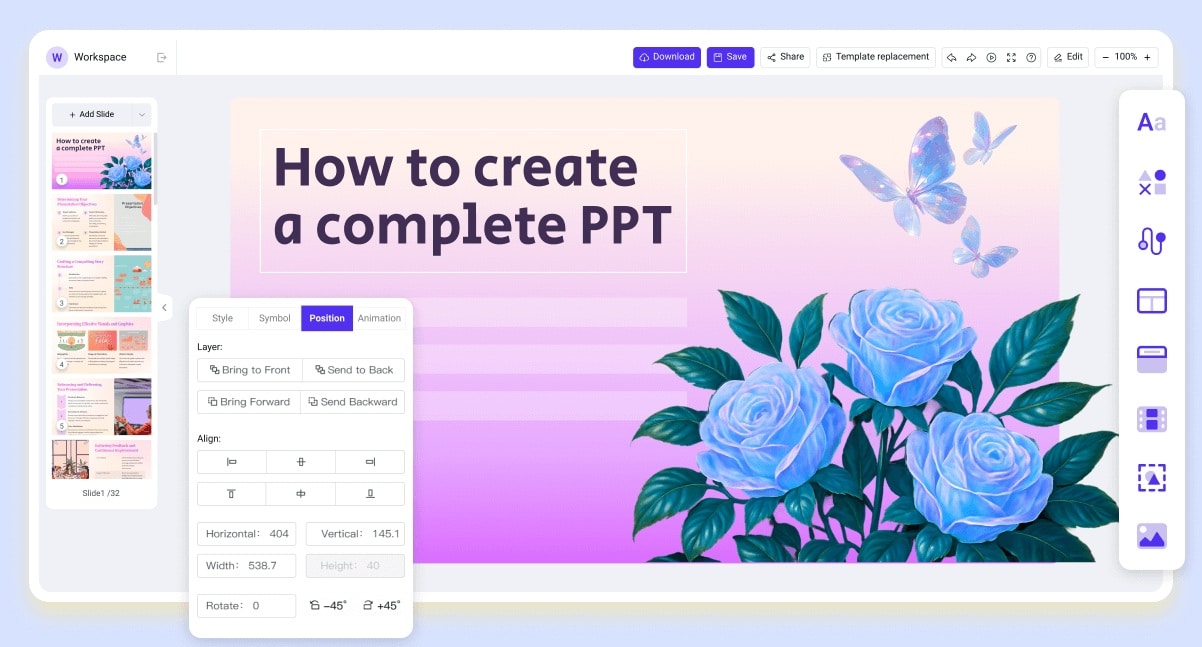
- Faster AI creation: WorkPPT creates full slides in seconds. You enter your topic or upload a file, and the AI builds the structure, layout, and content for you.
- 5K+ Templates: WorkPPT gives you more than 5,000 templates for business, education, reports, and creative presentations. This is much more convenient than searching online.
- Multilingual support: You can create slides in different languages without extra tools, making it easy to create presentations for diverse global audiences
- Present online: WorkPPT allows you to present your slides directly online. You do not need to download files or set up other software. This is useful for remote meetings, classes, or quick sharing.
- Powerful AI Tools: It includes an AI Summarizer for quick key points, AI PDF tools for simple file actions, an AI Mind Map to turn ideas into diagrams, and AI Chat for fast writing help.
3. Workflow Comparison: WorkPPT VS Traditional Tool
| WorkPPT AI Workflow | Manual (Traditional) Workflow |
| Step 1: Start | Step 1: Content Mining |
| Start with a topic, outline, simple prompt, or upload your file (PDF/Docx/TXT). | Spend hours searching, outlining, and writing the content yourself. |
| Step 2: Generate | Step 2: Manual Design & Formatting |
| Click one button. The advanced AI instantly generates the full slide deck: outline, text, images, and layout. | Spend hours on alignment, choosing fonts, and fixing the slide master. |
| Step 3: Edit & Polish | Step 3: Inconsistent Customization |
| You can freely customize the slides using simple drag-and-drop editing or swap visuals in seconds. WorkPPT automatically matches your uploaded images and logos to the template. | Struggle to make changes, often breaking the template design with every edit. |
| Step 4: Export & Share | Step 4: Final Conversion |
| Export to PPTX, PDF, PNG, JPG, or a Link. The files are fully compatible with PowerPoint and Google Slides. | Save your file and hope the format works correctly when sharing with others. |
4. WorkPPT for Every Professional and Scene
The speed and simplicity of WorkPPT benefit many different users:
For Business Professionals
In fast-paced workflows, time is money. WorkPPT allows you to create polished client decks, internal reports, and project updates in seconds. You can focus on the business strategy, not the slide formatting.
For Teachers & Students
Education requires clear communication. WorkPPT helps you generate lesson slides, study summaries, and project presentations with zero design hassle. This means less time on homework and more time for learning.
For Content Creators
If your work involves videos or social media, WorkPPT is a perfect tool to convert scripts, articles, and ideas into visually engaging slide content. You can quickly turn text ideas into images and visuals for your audience.
Conclusion
The age of painful, manual presentation making is outdated. WorkPPT gives a modern solution that takes on the hard work of structure and design. It saves a lot of time for you and allows you to focus on your content. Upgrade your workflow today. Try WorkPPT and upgrade your workflow today.
