
If your software testing process relies on manual methods or scripted automation, you have probably felt the strain of managing huge volumes of tests. Keeping your suites up to date, coordinating regression runs, and fixing broken scripts can be really tedious.
Many teams are already transitioning into AI-driven testing to address this issue. By adopting intelligent systems, they are able to better predict potential problem areas in the apps, write tests a lot faster, and maintain them with minimal manual intervention.
In fact, a 2024 study shows that 51% of QA engineers anticipate gen AI improving their test automation efficiency.
In this blog, we will talk in detail about how AI systems can help you optimize your testing lifecycle, improving the state of AI development solutions and other software endeavours. But before we get into that, let’s take a closer look at why exactly manual or even traditional automation falls short.
Why Manual Testing Doesn’t Scale With Speed
With manual testing, you might find it tough to match the speed at which modern apps evolve. Why? Because it primarily depends on human effort. Which means someone will have to design, execute, and document each test case by hand.
Now, imagine testing a retail banking app with a vast array of features. For just a simple fund transfer flow, you may have to write and execute multiple test cases covering account type, limits, authentication, transaction history, and more.
- Creating, managing, and validating tests can get difficult to handle when your test cases grow
- Re-running large regression suites manually is slow, prone to errors, and nearly impossible for frequent releases
- Different testers may interpret steps differently which can lead to variations in coverage and unreliable test outcomes
- Navigating through multiple pages and checking every functionality manually can cause fatigue and increase the risk of missed defects
Why Scripted Automation Breaks Under Constant Change
Once you realize manual testing is tough to manage, particularly for large and complex microservices-based apps, switching to automated script-based testing seems like the obvious next step.
Sure, automated testing can significantly improve the scalability and speed of your testing process. But it also presents a different set of challenges.
1. Tightly coupled tests fail when UI changes
Most traditional test automation scripts depend on static locators like specific button IDs, XPath, CSS selectors, or element positions to execute interactions with the app. So when you redesign a button, rename a field, or make even small tweaks to your UI, the scripts can no longer locate the UI elements and they fail.
2. Flaky tests and high maintenance
QA teams choose automation to make the testing process easier and more efficient. But when tests become flaky, they can undermine your trust in the reliability of the test suite, forcing you to re-run tests, investigate false failures, and spend time fixing tests rather than finding real bugs.
And this can drastically multiply your maintenance overhead and slow down the entire testing pipeline.
3. Static scripts can’t adapt to dynamic app behavior
Modern apps load content asynchronously, change element identifiers frequently, and respond differently based on real time data or user interactions. Traditional test automation scripts aren’t built to handle this fluidity.
They can only execute a fixed set of actions and create synchronization issues by attempting interaction before elements fully load.
4. Automation mostly covers known paths
Traditional automation tests predefined user flows, expected inputs, and documented scenarios. But they rarely explore the edge cases, unexpected user behavior, or unusual data combinations that are not scripted explicitly. Real users behave unpredictably which automation scripts may not be able to anticipate.
How Implementing an AI-First Approach Changes the Way Software Is Tested
AI is reshaping the entire testing lifecycle by changing how we build, execute, and maintain tests. AI combines machine learning, intelligent automation, and AI-powered agents to observe app behavior, spot patterns, adjust to changes, prioritize risk, and reduce repetitive work.
So, instead of focusing on how many tests passed/failed, you get insights into why a test failed, what actually matters for quality, and where to focus next.
Here’s how AI testing helps teams improve app quality:
- Testing shifts from script to intent: You prioritize assessing user goals and behavior, rather than sticking to rigid step-by-step instructions
- Reduces the need for micromanaging tests after changes: AI adapts to your changing UI, data, and user flows without needing manual script updates
- Test coverage evolves with software changes: You don’t have to stay fixed around predefined scenarios; AI helps you expand coverage as apps scale
- Continuous, intelligent feedback loop: Execution data feeds learning systems which refine tests, highlight risks, and make better testing decisions over time
AI agents are taking this shift one step further by observing app behavior, coordinating across different tools, managing test data, prioritizing risk based on real usage, and explaining failures with meaningful context.
One such agent built to operate directly within your testing pipeline is CoTester.
What Is CoTester?
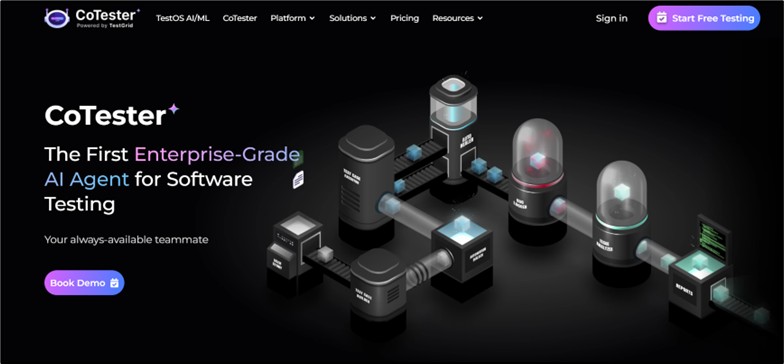
CoTester AI testing agent is built for modern software testing that generates and runs tests, adapts them as your app evolves, and keeps automation stable and resilient. It’s designed specifically for high-complexity environments, and comes with deep knowledge of testing workflows and enterprise QA practices.
Core capabilities of CoTester
1. Context-driven test authoring
CoTester learns your product context, adapts to your QA workflows, and then writes test code for you. This helps you reduce the upfront scripting effort, align your tests closely with the business intent, and generate relevant and maintainable tests right from the start.
2. Autonomous bug detection
The agent actively looks for bugs during execution and logs them automatically in real time. This means you get clear visibility into issues the moment they happen, detect problems earlier, minimize manual triage, and respond to defects faster.
3. Auto-healing intelligence
The built-in AI-powered autoheal engine, AgentRx, detects UI changes during test execution and updates scripts dynamically to prevent them from failing. It can handle structural shifts or even full redesigns, helping you reduce rework and prioritize real defects, not false failures.
4. Flexible test execution
CoTester allows your team to schedule test runs that align with your delivery cycles. You can set up regression tests to run weekly or queue execution just before a major release. This way, your team can maintain continuous coverage.
5. Multi-mode test case creation
You can build tests easily through no-code, low-code, or pro-code interfaces – whichever suits your team’s skills the best. You can also create test cases with the help of the record and playback feature or with user-friendly Selenium steps.
6. Human-in-the-loop control by design
This AI agent never runs anything without your approval. It pauses at critical checkpoints and seeks validation from your team to ensure alignment and helps you maintain control of the entire testing process, without slowing you down.
7. Continuous learning and optimization
CoTester improves with every test run and feedback cycle. It learns from past executions, failures, and user inputs to refine your tests with time. So, no matter how frequently your app, test data or user behavior changes, CoTester adapts along with it.
Testing With CoTester: How the Agent Works
1. Conversation flexibility for easy test generation
CoTester can understand user intent without rigid syntax constraints to deliver a more intuitive and seamless testing experience. You can use plain language to task it without a predefined script. Type “Hi” in the chat interface and start a conversation with CoTester.

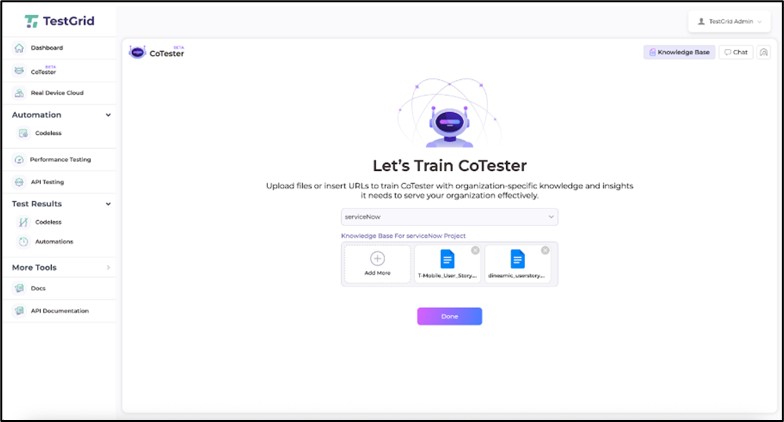
2. Train CoTester to align testing with your application
There are two ways through which you can help CoTester learn about your app.
a. File uploads
You can share your user stories from JIRA, requirements docs, or test plans in formats like Word, PDF, or CSV. CoTester then uses this information to generate test cases for you.
B. URL pasting
If you want to test web forms, flows, or page-specific validations, you can paste a link of the staging or production page, and CoTester scans it to generate executable test cases based on your prompt.
3. Dynamic test case editing
If you prompt CoTester, it’ll give you a thorough description of the test cases as well as a step-by-step editor that displays the automation workflow. You can use the editor or the chat interface to manually add or remove steps as needed.
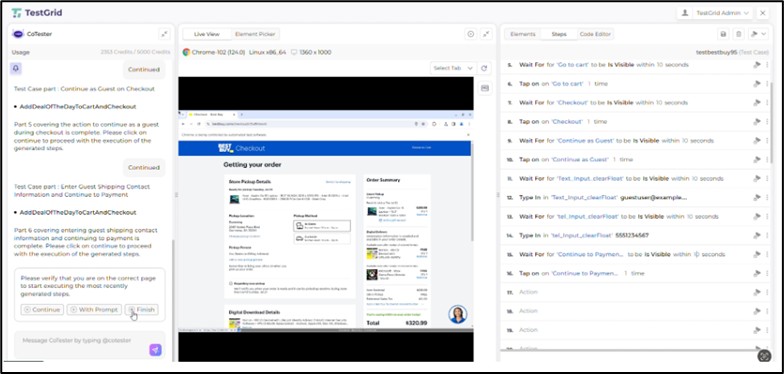
4. Execute in real device and browser environments
CoTester allows you to run tests on real devices and browsers and produce live feedback along with detailed logs and screenshots. This helps you verify your app’s features and functionality in conditions that closely reflect actual user experiences.
5. Ensure security with enterprise-grade governance
This agent supports private cloud and on-prem deployment, secure integrations, encrypted secrets, and full ownership of test code. This can be particularly helpful for environments that need strict control over data, execution, and test environment.
What QA Teams Actually Get Out of AI Testing
1. Shift in QA effort from maintenance to risk reduction
Because AI testing reduces flaky failures and script updates, your teams spend less time maintaining automation and more on areas where human judgment matters more such as risk analysis, exploratory testing, and assessing critical user journeys.
2. Confidence in releases, not just test results
AI-powered testing tools and agents surface execution evidence like logs, behavior traces, and contextual insights. This helps your team get to the root of test failures, reduce uncertainty, and make more informed release decisions.
3. Improving software quality without sacrificing control
With AI testing, you can move faster and scale coverage without handing over critical decisions to black box automation. Many AI tools today have built-in visibility, approvals, and human-in-the-loop safeguards which help your team retain oversight at every step.
Final Thoughts
It wasn’t very long ago that testing success was measured by how many tests passed, how many failed, and whether the planned test suite was completed on time.
But apps are now becoming increasingly layered, and with teams operating under tight delivery cycles, embedding AI into your testing process is a priority. And if you don’t make this shift now, you might end up wasting more time on maintaining brittle automation and chasing failures that have no real impact.
This doesn’t just slow your releases but pushes your users towards competitors that smartly use AI to deliver more consistent experiences. So, choose wisely before it is too late.
