
Key Takeaways
- Claude Cowork now starts at $20/month with a Pro subscription (expanded from Max-only access on January 16, 2026)
- Max 5x plan ($100/month) provides 5x Pro usage limits with full Cowork features
- Max 20x plan ($200/month) delivers 20x Pro usage limits for heavy users
- All subscription tiers provide identical Claude Cowork features; you pay for usage capacity, not functionality
- Claude Cowork consumes significantly more tokens than regular chat conversations
- Currently available only on macOS desktop app; Windows support planned
- No free trial exists for any paid tier of Claude Cowork

Using AI coding tools – artistic impression. Image credit: Alius Noreika / AI
Claude Cowork costs between $20 and $200 per month, depending on which subscription tier you choose. The entry point is the Pro plan at $20/month, which Anthropic opened to all subscribers on January 16, 2026. For users needing higher usage limits, the Max 5x plan runs $100/month while the Max 20x plan costs $200/month. All tiers grant access to identical Cowork features—the price difference relates entirely to how much you can use the tool before hitting rate limits.
Anthropic initially launched Cowork exclusively for Max subscribers on January 12, 2026. Four days later, the company expanded access to Pro subscribers after receiving strong interest from users who wanted agentic capabilities without the premium price tag. Pro subscribers can now access the feature for $20 per month, though Anthropic warns they may hit usage limits faster since Cowork consumes more tokens than regular chat.
Claude Cowork Pricing Breakdown by Plan
| Plan | Monthly Cost | Usage Capacity | Best For |
|---|---|---|---|
| Pro | $20 | Base level | Light users, occasional automation tasks |
| Max 5x | $100 | 5x Pro capacity (~225+ messages per 5 hours) | Moderate daily users with regular Cowork needs |
| Max 20x | $200 | 20x Pro capacity (~900+ messages per 5 hours) | Heavy users who rely on Claude for full-time work |
The Max plan is available in multiple tiers to match your usage needs: Max 5x at $100 per month provides 5 times more usage than the Pro plan, while Max 20x at $200 per month provides 20 times more usage than the Pro plan.
What makes Cowork pricing different from standard chat subscriptions is the computational intensity of agentic tasks. Working on tasks with Cowork consumes more of your usage allocation than chatting with Claude because complex, multi-step tasks are compute-intensive and require more tokens to execute. A single Cowork session organizing files or generating reports might use as much quota as dozens of regular chat messages.
What You Get With Each Subscription Tier
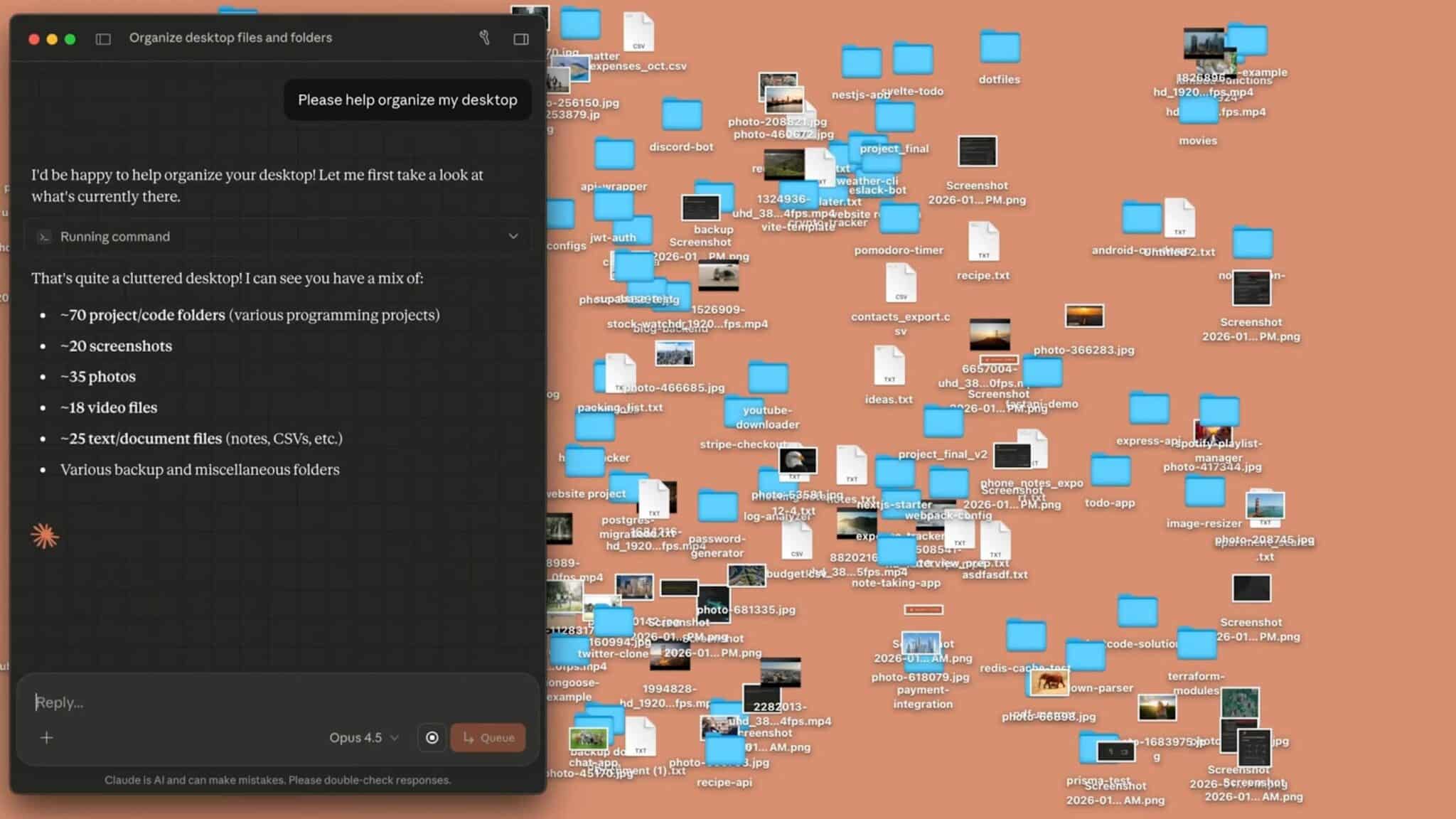
Claude Cowork interface. Image credit: Anthropic
Pro Plan ($20/month)
The Pro subscription provides access to Cowork alongside other features including Claude Code terminal access, extended context windows, and Google Workspace integration. The Pro plan is available for $20 per month (US), with pricing in your local currency where supported.
Pro users should expect to hit usage limits faster when running Cowork for extended sessions. The tool works identically to Max subscriptions, but the lower usage allocation means you need to plan your automation tasks more strategically.
Max 5x Plan ($100/month)
Max 5x provides around 225+ messages per 5-hour window with full Cowork access and complete functionality. This tier suits moderate users who occasionally need Cowork for specific tasks.
The 5x multiplier applies to your overall Claude usage, not just Cowork specifically. You also gain access to Claude 4.5 Opus, Anthropic’s most capable reasoning model, which can handle more complex analytical tasks during Cowork sessions.
Max 20x Plan ($200/month)
Max 20x offers around 900+ messages per 5-hour window with identical features to the 5x tier. This plan suits heavy users who rely on Claude for full-time work
For professionals running Cowork throughout the workday or automating large-scale file operations, the 20x tier provides the headroom needed to avoid frequent rate limit interruptions.
How Usage Limits Actually Work
Claude’s rate limits operate on rolling 5-hour windows rather than daily caps. Instead of daily limits, Claude Max uses rolling 5-hour windows. If you hit your cap at 2 PM, you don’t have to wait until midnight—you’ll get a fresh allowance around 7 PM.
This system offers more flexibility than traditional daily limits but requires understanding that Cowork sessions drain your allocation faster than standard conversations. A complex file organization task running terminal commands, analyzing documents, and creating outputs consumes tokens at every step.
If you find yourself hitting usage limits frequently when using Cowork, consider batching related work into single sessions, using standard chat for simpler tasks that don’t require file access or extended execution, and monitoring your individual usage in Settings.
What Claude Cowork Can Do For the Price
Cowork provides agentic capabilities that justify the subscription cost for users with the right workflow needs:
- File Organization and Management: Point Claude Cowork at your Downloads folder containing hundreds of files, and it can sort them into categorized subfolders, rename files based on content analysis, and delete duplicates—all autonomously.
- Document Generation: Claude Cowork handles office file formats through built-in skills for xlsx, pptx, docx, and PDF files. You can request formatted reports, spreadsheets with working formulas, or presentation decks generated from your source materials.
- Batch Operations: Need to convert dozens of Word documents to PDFs, compress images, or standardize file naming across a project folder? Claude Cowork executes these operations using tools like LibreOffice and Ghostscript running locally on your machine.
- Browser Automation: When paired with the Claude in Chrome extension, Cowork can navigate websites, fill forms, and complete multi-step web tasks. The process runs slower than file operations (each interaction requires a screenshot cycle), but it handles tasks like unsubscribing from newsletters or gathering web research.
Current Platform Limitations Worth Knowing
Claude Cowork remains in research preview and is available only to macOS app users. Anthropic plans to offer access to Windows users too, but exact details on a release timeline are yet to be determined.
Unlike many SaaS products, Claude Max offers zero free trial period. You can’t test Cowork before committing to the $100 or $200 monthly fee. Pro subscribers have a lower barrier to entry at $20, but they still commit without a trial option.
Other constraints to factor into your decision:
- Cowork requires an active internet connection throughout sessions
- The Claude Desktop app must remain open while tasks run
- Cross-device sync is not yet available (planned for future updates)
- Cowork activity does not appear in Audit Logs or Compliance API
Is Claude Cowork Worth the Cost?
The value calculation depends on how often you perform tasks that Claude Cowork can automate. If Cowork saves you 5 hours per month and your time is worth $50/hour, that’s $250 in value for a $100-200 investment.
For professionals who regularly spend time organizing files, converting document formats, or handling repetitive computer tasks, the subscription pays for itself quickly. Users who need occasional automation may find the Pro tier sufficient, reserving Cowork for specific projects while using standard chat for daily work.
The absence of a free trial means evaluating fit requires committing to at least one month. If you’re unsure how much usage you need, start with Max 5x. Anthropic supports mid-cycle upgrades with prorated pricing. If 5x isn’t enough, you can upgrade to 20x anytime.
Getting Started With Claude Cowork
To access Cowork, download the Claude Desktop app for macOS, ensure you have a Pro or Max plan subscription, and look for the mode selector that includes “Chat” and the Cowork tab. Click the Cowork tab to switch modes to “Tasks.”
From there, describe your task in plain language, grant folder access when prompted, and let Claude work through the execution while keeping you informed of progress. The interface mirrors the familiar chat experience but with the ability to take real action on your local files.
If you are interested in this topic, we suggest you check our articles:
- Gemini 2.5 Pro Performance Analysis: How It Stacks Against Leading AI Models
- Copilot vs Codeium vs Cursor vs Gemini: The 2025 Coding Assistant Smackdown
- Modern Google AI Tools in the Language Learning Process
Sources: Claude, Engadget, DataCamp, Simon Willison
Written by Alius Noreika
