
AI tools now handle some of the most tedious parts of studying — summarizing dense textbooks, generating flashcards from lecture notes, creating practice quizzes, and scheduling revision sessions around exam dates. For students in 2026, these are no longer experimental features. They are built into platforms used daily by millions of learners worldwide. The global AI-in-education market reached $9.58 billion this year and is projected to grow to $136.79 billion by 2035, according to Precedence Research.

In a library – artistic impression. Image credit: Freepik, free license
Key Takeaways
- ChatGPT’s Study Mode offers guided, step-by-step learning instead of handing over quick answers, with built-in progress tracking and personalized difficulty adjustments.
- Google NotebookLM turns uploaded documents into flashcards, quizzes, audio “podcast” summaries, video overviews, and interactive mind maps — all grounded in source material to reduce AI hallucinations.
- Perplexity AI provides citation-first research with an Academic Focus Mode restricted to peer-reviewed journals and scholarly databases, plus a free 12-month Pro plan for verified students.
- Pearson’s AI Study Tool is curriculum-aligned and built on publisher-authored content; 75% of surveyed students rated it helpful or extremely helpful.
- Grammarly, Otter.ai, Notion AI, ChatPDF, Gemini, and dedicated flashcard generators each target specific pain points, from real-time lecture transcription to writing refinement.
- Over-reliance on AI risks weakening critical thinking; Stanford policy treats AI use as analogous to receiving help from another person, and most institutions now require disclosure.
- Effective AI-assisted studying means using these tools to support active engagement with material, not to outsource the thinking itself.
Ten specific tools stand out for students who want practical, immediate help. They range from AI-powered study modes inside ChatGPT and Google’s NotebookLM to citation-focused research engines like Perplexity, document summarizers like ChatPDF, writing assistants like Grammarly, and curriculum-aligned platforms like Pearson’s AI Study Tool. Each one targets a different part of the learning process — and knowing which tool fits which task makes the difference between wasted time and actual progress.
1. ChatGPT Study Mode: A Guided Tutor, Not a Shortcut
OpenAI introduced Study Mode as a dedicated setting inside ChatGPT. Once activated in the chat settings, it shifts the AI from providing direct answers to walking students through problems with hints, follow-up questions, and step-by-step explanations. The tool gauges a student’s current understanding and remembers past sessions, adjusting difficulty accordingly.
Practical applications include working through homework problems one question at a time, preparing for exams with AI-generated quizzes and open-ended knowledge checks, having essays pre-graded against a rubric before submission, and decoding tough passages from textbooks or primary sources. Progress tracking shows which topics a student has mastered and where gaps remain. Students can also upload lecture slides and have ChatGPT act as a study buddy, talking through each slide with 30-second overviews and context about why each concept matters.
The mode also supports learning-by-teaching — students explain a concept to ChatGPT as if it were a classmate, and the AI asks follow-up questions that probe understanding. This reversal forces active recall instead of passive absorption.
2. Google NotebookLM: Source-Grounded Research and Revision
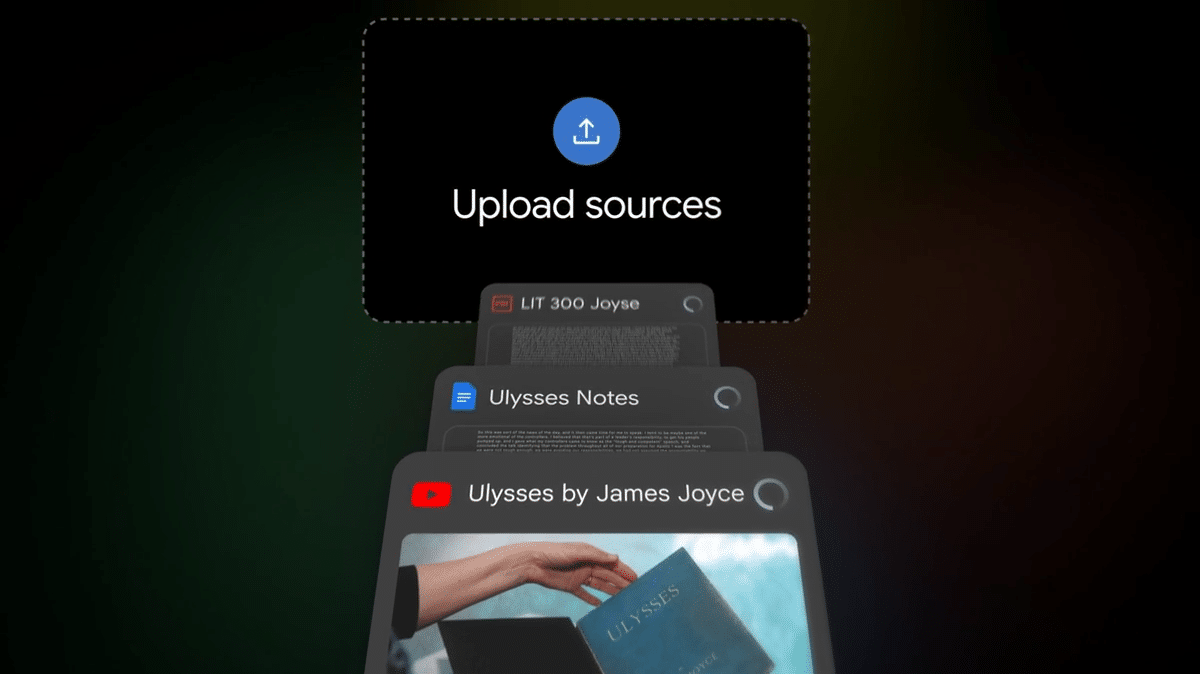
Image credit: NotebookLM
NotebookLM is Google’s AI research assistant, powered by Gemini 3 as of March 2026. Its core advantage is that every response is grounded in the documents a student uploads — lecture notes, PDFs, Google Docs, Slides, or YouTube video transcripts. This closed-source approach significantly reduces hallucinations compared to open-ended chatbots.
The tool’s Studio panel now generates flashcards, quizzes, study guides, briefing documents, mind maps, infographics, slide decks, data tables, and even blog-post-style explainers — all from uploaded material. Students can customize difficulty level, topic focus, and the number of items generated. When a quiz answer is wrong, clicking “explain” produces a detailed walkthrough with citations pointing back to the original source.
NotebookLM’s Audio Overviews feature gained widespread attention for converting dense academic material into conversational podcast-style discussions between two AI hosts. The newer Interactive Mode lets students interrupt the audio to ask questions mid-discussion, turning passive listening into active tutoring. Video Overviews added in 2025 combine AI narration with diagrams and structured visual explanations, now available in over 80 languages. The free version is surprisingly robust, with Pro users getting expanded storage and features like Deep Research.
3. Perplexity AI: Citation-First Academic Research
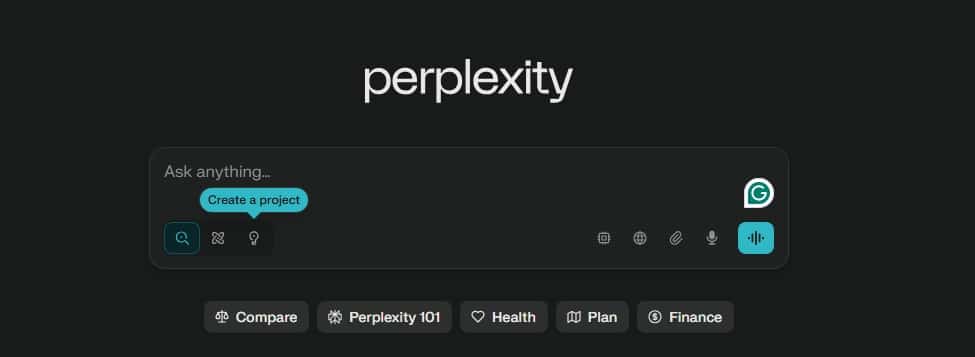
Perplexity AI web interface.
Perplexity occupies a specific niche that neither ChatGPT nor traditional search engines fill well. Instead of generating text and hoping it’s accurate, Perplexity searches the web in real time, pulls from academic databases, and attaches numbered source citations directly to every claim in its responses. Students can click through to read the full original paper or article.
The Academic Focus Mode restricts searches to peer-reviewed journals and scholarly publications rather than the general web — a critical distinction for research papers and literature reviews. Additional modes include Writing (for drafts), Math (for step-by-step problem solving), Video (searching YouTube), and Social (pulling from platforms like Reddit). The Deep Research feature handles complex, multi-step questions by running extended searches and synthesizing findings into report-grade output.
For students, the pricing structure is unusually generous. The Education Plan offers verified students 12 months of full Pro access for free, including unlimited file uploads, Study Mode, and access to multiple AI models. A referral program running through May 2026 can extend free access by up to 24 additional months.
4. Pearson AI Study Tool: Curriculum-Aligned, Publisher-Backed Content
Unlike general-purpose chatbots, Pearson’s AI Study Tool draws exclusively from Pearson-authored textbook content. This means responses stay aligned with the specific course a student is taking, reducing the risk of inaccurate or off-topic information. The tool is integrated into MyLab, Mastering, and Pearson eTextbooks.
Students get on-demand summaries, step-by-step explanations, and targeted practice exercises. The AI tracks which concepts a student struggles with and adjusts accordingly. Usage data from Pearson shows strong adoption patterns: 75% of students surveyed rated the tool helpful or extremely helpful, 90% said it was easy to use and boosted their confidence, and students using the tool in integrated eTextbooks were 23 times more likely to become active readers. Over 60% of usage occurred outside standard business hours — confirming the tool’s role as an always-available study partner.
“What I like about Pearson’s AI Study Tool is that it gives follow-up prompts that help my students dig deeper. What my students also love about the tool is that they trust the information.”— Dr. Derek Weber, Professor, Raritan Valley Community College
Pearson also offers AI Literacy Modules across 170+ courses, teaching students how to use AI tools responsibly, validate results, and cite AI-generated content. Students earn Credly badges upon completion — credentials recognized by employers.
5. Grammarly: Real-Time Writing Feedback Beyond Spell-Check
Grammarly goes well beyond grammar correction. The AI writing assistant reviews text in real time for clarity, tone, word choice, sentence structure, and audience appropriateness. For students writing essays, research papers, emails, and lab reports, it acts as a persistent editor that catches issues humans tend to miss during self-review.
The tool offers significant student discounts through .edu email verification. Its value is most apparent during the revision stage — students write their own drafts, then use Grammarly to refine structure and eliminate errors. The critical distinction: Grammarly polishes what a student has already written, rather than generating content from scratch. This makes it one of the least controversial AI tools in terms of academic integrity.
6. Otter.ai: Real-Time Lecture Transcription and Note Generation
Otter.ai records and transcribes lectures in real time, producing searchable text with automatically highlighted key terms. After class, it generates summaries that students can review instead of relying on incomplete handwritten notes.
The tool is most valuable for students who learn better through active listening and discussion rather than furious note-taking. By offloading transcription to AI, students can stay engaged during lectures and focus on understanding concepts as they are presented — then review the transcript afterward for details they may have missed. Otter.ai also supports meeting transcription for group project planning and study sessions.
7. ChatPDF and Adobe Acrobat AI Assistant: Conversational Document Analysis
Both ChatPDF and Adobe Acrobat’s AI Assistant let students upload PDFs and interact with them through conversation. Instead of manually searching through a 200-page textbook to find where a concept is discussed, students ask questions and receive contextual answers drawn directly from the document text.
Adobe Acrobat AI Assistant integrates with the broader Acrobat ecosystem, allowing annotation, highlighting, and cross-document organization alongside AI-powered summarization. ChatPDF focuses specifically on the upload-and-ask workflow, making it faster for one-off document analysis. Both tools support iterative questioning — if an initial explanation is unclear, students can ask for simpler language, examples, or comparisons until the concept clicks.
For case studies and literature reviews that involve synthesizing information from multiple sources, these tools identify themes, track citations, and highlight connections across documents that manual reading might miss.
8. Google Gemini: Multimodal Learning Across Text, Image, and Video
Google’s Gemini operates as a multimodal AI assistant that processes text, images, audio, and video together. Students can photograph a whiteboard diagram, a handwritten equation, or a textbook figure and ask Gemini to explain what they’re looking at. The “understand visual information” capability is particularly useful for STEM subjects where diagrams and graphs carry as much meaning as text.
Gemini also serves as a research assistant, helping students find sources, draft outlines, and refine project ideas. Google offers dedicated student training resources through its “AI training and tools for Students” program, covering homework help, exam preparation, writing assistance, and job search support. The company provides a downloadable guide specifically focused on effective prompting techniques for personalized learning with Gemini and NotebookLM.
For students on Google Workspace for Education, Gemini integrates directly into Google Docs, Sheets, and Slides. Google’s AI Pro student plan also provides a full year of advanced Gemini features free of charge.
9. Notion AI: Organizing Notes, Tasks, and Study Schedules
Notion AI adds an intelligence layer on top of Notion’s existing workspace — notes, databases, task lists, calendars, and project boards all in one place. The AI can summarize meeting notes, generate action items from lecture recordings, create study schedules based on exam dates, and search across an entire student’s workspace to find relevant information quickly.
Where Notion AI differs from dedicated study tools is scope. It handles the organizational overhead that surrounds studying — tracking assignment deadlines, managing group project workflows, storing research materials in structured databases, and maintaining a personal knowledge base that accumulates over a semester or an entire degree. Over 10,000 templates are available for students who want to start with a pre-built structure.
For students juggling multiple courses, extracurriculars, and part-time work, having a single AI-enhanced workspace eliminates the friction of switching between six different apps for notes, tasks, calendars, and documents.
10. AI-Powered Flashcard and Spaced Repetition Tools
Dedicated AI flashcard generators — built into platforms like NotebookLM, ChatGPT, and standalone apps — analyze uploaded documents and automatically identify key terms, definitions, formulas, and concepts worth memorizing. Instead of spending hours manually creating cards, students upload a PDF or set of notes and receive a complete deck in seconds.
The most effective of these tools incorporate spaced repetition algorithms, showing cards at optimized intervals based on how well a student remembers each item. Cards a student gets wrong appear more frequently; mastered cards fade into longer review cycles. This approach is backed by decades of cognitive science research showing that spaced practice and active recall produce stronger long-term retention than passive rereading or highlighting.
These generators work across subjects — vocabulary for language courses, historical dates, chemistry formulas, legal precedents, anatomical terms. Combined with AI-generated practice quizzes that test comprehension at varying difficulty levels, they form one of the most research-supported study methods now available in AI-powered form.
What the Research Says About AI-Assisted Studying
The effectiveness of AI study tools depends entirely on how students use them. Herbert Simon, a founder of cognitive science, described the principle concisely: learning results from what the student does and thinks, not from what the tool does. Strategies that require deep processing — comparing concepts, explaining material in one’s own words, self-testing — consistently outperform superficial methods like highlighting or rereading, according to research published in Psychological Science in the Public Interest by Dunlosky, Rawson, Marsh, Nathan, and Willingham (2013).
AI tools become powerful when they support these active strategies. Using NotebookLM to generate a quiz and then working through it with the textbook open is active learning. Asking ChatGPT to write a summary that a student then submits without reading the source text is not. The distinction matters both for learning outcomes and for academic integrity.
Stanford University’s Generative AI Policy Guidance treats any use of generative AI as analogous to receiving help from another person. Using AI to substantially complete an assignment is always prohibited. A January 2026 survey by the American Association of Colleges and Universities found that 95% of college faculty worry about student over-reliance on AI and diminished critical thinking. Most institutions now require disclosure of AI use and have policies specifying which applications are acceptable.
Risks to Watch
AI tools carry documented limitations. They sometimes produce incorrect information — so-called hallucinations — because they generate statistically plausible responses rather than factually verified ones. Research from Columbia Journalism Review found that AI search engines perform poorly at citing news sources accurately. Training data biases around geographic and population diversity can further skew AI-generated content. Students should treat AI output as a starting point that requires verification against primary sources, not as a finished answer.
Over-reliance also risks atrophying critical skills. If a student never reads a primary text because an AI summary exists, the ability to independently interpret complex material weakens over time — a skill that exams and professional careers still require.
| AI Study Tool | Primary Strength | Best For | Student Pricing |
|---|---|---|---|
| ChatGPT Study Mode | Guided step-by-step problem solving | Exam prep, homework walkthroughs | Free tier available; Plus $20/mo |
| Google NotebookLM | Source-grounded flashcards, quizzes, audio/video overviews | Document-heavy revision, literature reviews | Free; Pro via Google One AI |
| Perplexity AI | Citation-first research with Academic Focus Mode | Research papers, sourced essays | 12 months free for students |
| Pearson AI Study Tool | Curriculum-aligned, publisher-verified content | Textbook-based courses (MyLab, Mastering) | Included with Pearson materials |
| Grammarly | Real-time writing correction and tone adjustment | Essays, emails, research papers | Student discount with .edu email |
| Otter.ai | Real-time lecture transcription | Note-taking, meeting summaries | Free tier; student plans available |
| ChatPDF / Adobe AI | Conversational PDF analysis | Textbook comprehension, case studies | Free tiers; Adobe student pricing |
| Google Gemini | Multimodal input (text, image, video) | STEM diagrams, visual problem solving | Free AI Pro plan for students |
| Notion AI | All-in-one study organization | Scheduling, project management, notes | Free for education; AI add-on |
| AI Flashcard Generators | Spaced repetition from uploaded notes | Memorization-heavy subjects | Varies; many free options |
How to Use AI Study Tools Responsibly
The most important step is knowing your institution’s AI policy before using any tool for coursework. Policies vary not just between universities but between individual courses, because each class has distinct learning goals. Stanford’s guidance is a useful benchmark: assume AI use is not allowed unless the syllabus or assignment instructions say otherwise, and disclose any AI assistance you receive.
Beyond policy compliance, the practical guideline is straightforward: use AI tools to support your own thinking, not to replace it. Let a flashcard generator create cards from your notes, but review and test yourself on the content actively. Use a summarizer to get an overview of a long reading, then read the most relevant sections yourself. Ask ChatGPT to quiz you on a topic, then verify your answers against the original material. The learning happens through your engagement with the content, not through the AI’s processing of it.
Always verify factual claims and citations produced by AI against original sources. Develop your own summarization and analysis skills alongside AI assistance, so you remain capable without these tools when needed — including during proctored exams where AI is unavailable.
