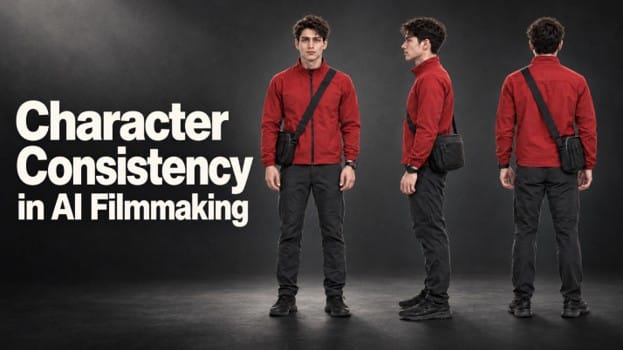
Picture a courier walking down the street and into a café. You generate two shots with an AI video tool: the first looks great, but in the second, the courier’s hairstyle, face or red jacket has changed, leaving viewers unsure whether they’re watching the same person. Character consistency in AI filmmaking starts with a clear design and a few well-chosen reference images. This guide covers how to create reference views, use them across scenes and check the shots together before finishing your film.
What Does Character Consistency Mean in AI Filmmaking?
Character consistency in AI filmmaking means viewers can recognise the same character throughout the film. Expressions, poses and lighting can change, while the character’s defining features stay consistent. The shots don’t need to look identical; viewers should still recognise the same person.
Focus on three groups of details:
- Face and hair: Keep key facial features, hairstyle, and hair colour consistent.
- Body and silhouette: Preserve the overall build and proportions of the character.
- Clothing and accessories: Keep important items, such as jackets, bags, or hats, unless the story explains a change.
For example, the courier wears a red jacket and a black crossbody bag. Those details should stay consistent as they walk down the street and enter the café.
Some changes are intentional. If viewers see the courier take off a hat, they understand why the character looks different. A hairstyle that changes without explanation can make the shots feel disconnected.
The idea is to maintain the details that help viewers track the character.
Design Your Character in Flova and Create Front, Side, and Back Views
Flova is an AI video creation tool you can use through conversation. Describe your character’s appearance, hairstyle, clothing and visual style. If you already have a character image you like, Flova can use it to create front, side and back views. Once the character design is approved, use it as a reference while you build the storyboard and create shots. Save the approved images so you can reuse the same character in future projects and stories.
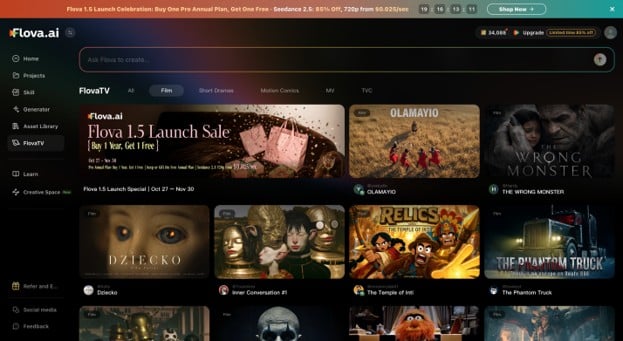
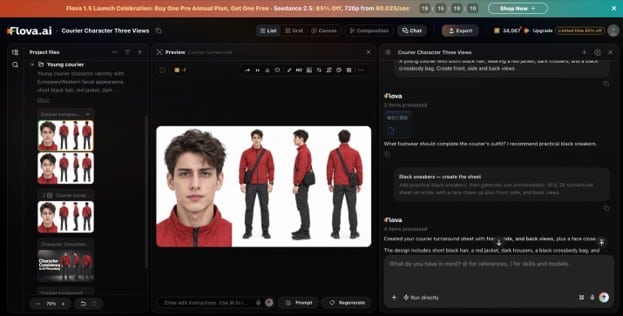
Start by telling Flova Agent what your character should look like: short black hair, a red jacket, dark trousers and a black crossbody bag. Choose a character image that matches this description, then use it to create front, side and back reference views.
Each view serves a different purpose:
- Front view: Shows the face, hairstyle, jacket, and details seen from the front.
- Side view: Shows the character’s profile and where the crossbody bag sits.
- Back view: Shows the rear of the jacket, hairstyle, and position of the bag.
Check the three views before using them. Does the hair look the same? Is the jacket the same colour and style? Does the bag retain the same position? Fix differences before creating more scenes.
Once the images are approved, save them as your character references. They give you a consistent visual starting point for later shots and show how the character should look from different angles.
Example character brief
A young courier with short black hair, wearing a red jacket, dark trousers, and a black crossbody bag. Create front, side and back views from the approved image. Keep the facial features, hairstyle, clothing, and bag consistent.
Use the Approved Character References Across Different Scenes
Use the approved character references as you plan each scene. Actions, camera angles, settings and lighting can change from shot to shot, while the character’s defining features stay recognisable.
For each shot, describe the action and setting, then choose the reference view that best shows the relevant features.
- Street shot: The courier walks towards the camera, with their face, red jacket and crossbody bag visible. Use the front reference to guide their facial features and clothing.
- Café entrance: The courier turns to push open the door, revealing their profile and part of their back. Use the side and back references to guide the hairstyle, jacket and bag.
- Counter shot: The camera returns to the courier’s face as they reach the counter. Compare the result with the approved design and the earlier street shot.
The character images show who appears on screen. The shot description explains what they’re doing, where the action happens and how the camera is positioned. Use the same character references as the scene changes.
If the bag is visible, describe its approved shape and position. If the face is hidden, focus on the hairstyle, clothing and silhouette.
Check the Character Across Cuts, Not Just Individual Images
A shot can look convincing on its own and still feel wrong in a sequence. Compare each shot with the approved character references, then watch the scenes in order.
Look for four common problems:
- Facial features or hairstyle change unexpectedly.
- Clothing or accessories disappear or look different.
- Front, side, and back views show conflicting details.
- An appearance change has no explanation in the story.
Imagine the courier walking through heavy rain before entering the café. Their red jacket is wet in the street shot. If it suddenly looks dry in the next shot and no time has passed, the change can break continuity.
Not every visual difference is a mistake. Indoor lighting can make the jacket look darker, a new camera angle can hide part of the face or bag, and movement can make small details harder to see.
Prioritise changes that affect recognition or confuse the story. A different hairstyle or missing bag deserves attention before a small difference in shadow or fabric texture.
Ask yourself: Does this still look like the approved character? Does the change make sense in the story? Does the shot fit with those around it? These questions can help you catch problems that are easy to miss when reviewing images individually.
Key takeaway: Judge continuity against the character references, the surrounding shots and what has happened in the story.
Give Specific Feedback When a Shot Needs Fixing
A generated shot may still differ from the approved design. Identify the exact detail that needs changing. Vague feedback such as “The character looks wrong” doesn’t explain what to fix.
Give specific instructions:
- Rather than “Fix the face,” name the facial feature or hairstyle that differs from the reference.
- Instead of “Fix the clothes,” ask for the approved red jacket and dark trousers.
- If the bag changes, describe its correct position and refer to the approved side or back view.
Say what should stay the same, too. If the courier’s movement as they open the café door already works, ask to keep the action and framing while correcting the bag. This gives the revision a clear focus.
Flova is an AI film maker that lets you use approved character images and turnaround views when revising individual shots. If the courier’s hairstyle or bag looks different in the café entrance shot, point out those details directly.
Example revision request
“Keep the short black hair, red jacket, and black crossbody bag from the approved character references. The courier is turning sideways to push open the café door. Match the bag’s appearance to the approved back view. Keep the action and camera framing unchanged.”
Play the street shot, the revised café entrance shot and the counter shot in sequence. Check that the character’s appearance stays consistent across the cuts and that the revision fits the surrounding footage.
If complicated movement or objects blocking the character make them hard to recognise, try a simpler camera angle. Reference images give the AI a visual basis, but they don’t guarantee a perfect match. Review each result and correct any mismatches.
Closing — Get One Short Sequence Working First
Start with three connected shots before building a longer film. Create your character in Flova, generate front, side and back views from the approved image, and reuse those references across the scenes. Watch the sequence and fix any changes that make the character hard to recognise. Can viewers follow the courier from the street into the café without wondering whether it’s the same person? If so, you have a solid starting point for a longer AI short film.