A developer drops a finished mix into a general speech-to-text model, presses Transcribe, and waits. The chorus comes back mangled, a backing vocal turns into a duplicate line, and the subtitle keeps rolling long after the singer stops.
Anyone who has run music through a model built for meetings knows this moment. The model is not broken. It was trained on talk, and a song is a different signal.
Getting recognizable words is only the first job. A usable result also needs clean line breaks, timing that lands on the beat, and a file that a music player, video editor or karaoke setup can read without conversion.
A new group of music-aware tools now handles that whole chain. They accept real recordings, let the user correct mistakes, and export formats that musicians actually use. This guide compares six of them on input, editing, timing control and export range, so the right pick is clear before the next upload.
What Makes Lyrics Hard for AI to Transcribe
Why Sung Audio Breaks Speech Models
Speech recognizers grew up on podcasts and phone calls. Songs work differently.
Pitch bends stretch every vowel, so the acoustic pattern a model expects no longer matches what it hears. Instruments compete for the same frequencies as consonants and mask the sharp edges that separate “kiss” from “this.”
Producers add reverb, delay and saturation to make vocals sound bigger. Those effects smear syllables into a wash that sounds great to listeners and confuses an algorithm.
Tempo adds another problem. Fast delivery leaves only milliseconds between words, while half-time breakdowns create long gaps that a generic model can read as silence.
Backing vocals make it harder again. When harmonies overlap the lead, two melodies land on one transcript, and the software picks the louder one or blends them into a phantom phrase.
Song structure causes trouble too. A long instrumental intro can push the first timestamp off, so the first lyric appears late. Repeated choruses should match word for word, but some models paraphrase them.
Why Editable Words and Timing Matter
A transcript with perfect spelling is still not usable if each line lands two beats late. The words have to be sung, displayed or synced in time with the music.
That is why the real test goes beyond word-error counts. A good tool lets the user jump to a difficult verse, type the correct lyric, and move the timestamp until the line sits on the downbeat. A better tool adds word-level cues for karaoke highlights or lyric-video animation.
The output format shapes the rest of the workflow. Plain text is fine for reference, but a music player looks for LRC, a video editor needs SRT or VTT, and styled karaoke uses ASS or Enhanced LRC. The wrong file type adds a conversion step.
The two most common formats store timing differently. An LRC file puts a timestamp such as [00:12.40] in front of each lyric line, which tells a player when to show it. An SRT file uses numbered blocks, each with a start time, an end time and the text between them, which is what most video editors and platforms expect for captions. A tool that exports both covers most musicians’ needs.
Source separation can help by isolating the vocal before transcription. Research on Whisper and music source separation found that separation artifacts can also cause missed words and hallucinated lines (arXiv study). A practical approach is to transcribe both the full mix and a vocal stem, then keep whichever result needs less correction. The same trade-offs apply to general AI subtitling and speech-to-text tools, which were built for dialogue first.
A Quick Workflow for Cleaner Results
A few habits improve the output of every tool in this list. Start from the cleanest version of the song available, such as a mix without heavy crowd noise or a vocal bounce from the session. Check the opening verse and the first chorus by ear before trusting the rest, because errors there usually repeat later. Fix the words first and the timing second, since a corrected word can change where a line should break. Finally, export the format that the next tool in the chain expects, so the file does not need conversion.
These points set the criteria for this list: editable timing, export range, input flexibility, and a clear fit for one production task.
1. Neural Frames Song to Lyrics
How the Preview Works
Neural Frames treats transcription as a first check, not a blind commitment. The user uploads an MP3, WAV, M4A, FLAC or OGG file of up to 20 MB and ten minutes.
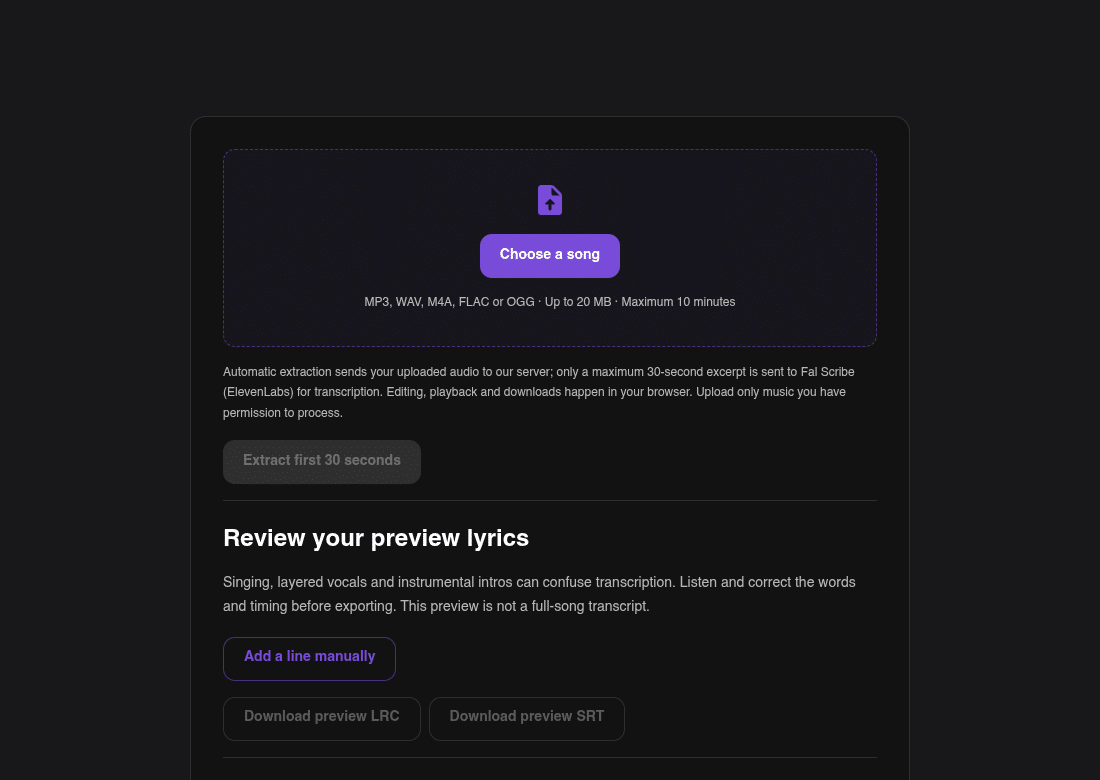
Neural Frames Song to Lyrics: upload, review the preview lyrics, then export LRC or SRT
The browser tool transcribes the first 30 seconds and shows the lines for review. That short sample quickly shows where a track will cause trouble, such as layered vocals, dense guitars or a long instrumental intro. The tool page states openly that singing, layered vocals and instrumental intros can affect accuracy.
The 30 seconds are a preview, not a full-song transcript. The full song continues in the Neural Frames app after signup. Because the tool transcribes existing recordings, it never writes lyrics or generates music. The preview is most useful as a fast test of how the transcription handles a particular voice and mix before the whole song goes into the app.
Editing and Export
Every line in the preview can be edited. The user corrects a misheard word, sets each line’s start and end time, and adds a line by hand if the transcription missed one. Playback runs in the browser, so each change can be checked by ear.
When the lines are correct, the user can export the lyrics preview as an LRC file, which stores lines with start times for compatible players, or as an SRT file, which stores timed text with start and end times. Both files carry the corrected timing.
The next step is where Neural Frames differs from a pure transcription service. It is an AI music video and lyric video tool for musicians who work from their own audio, so the corrected song can move straight into visual work. For a musician who needs timed lines and a lyric video from the same track, Neural Frames leads this list.
2. LyricTime Timed Lyrics Editor
Dedicated Timing Controls
LyricTime starts with a simple uploader. Its homepage lists MP3, WAV and M4A, while its FAQ mentions MP3 files of up to 15 MB, so it is worth checking the current limit before uploading a long studio bounce.
The user can choose between two modes. One uploads the audio with existing lyrics, and the tool matches each word to the audio. The other uploads the audio only, and LyricTime transcribes first and then syncs.
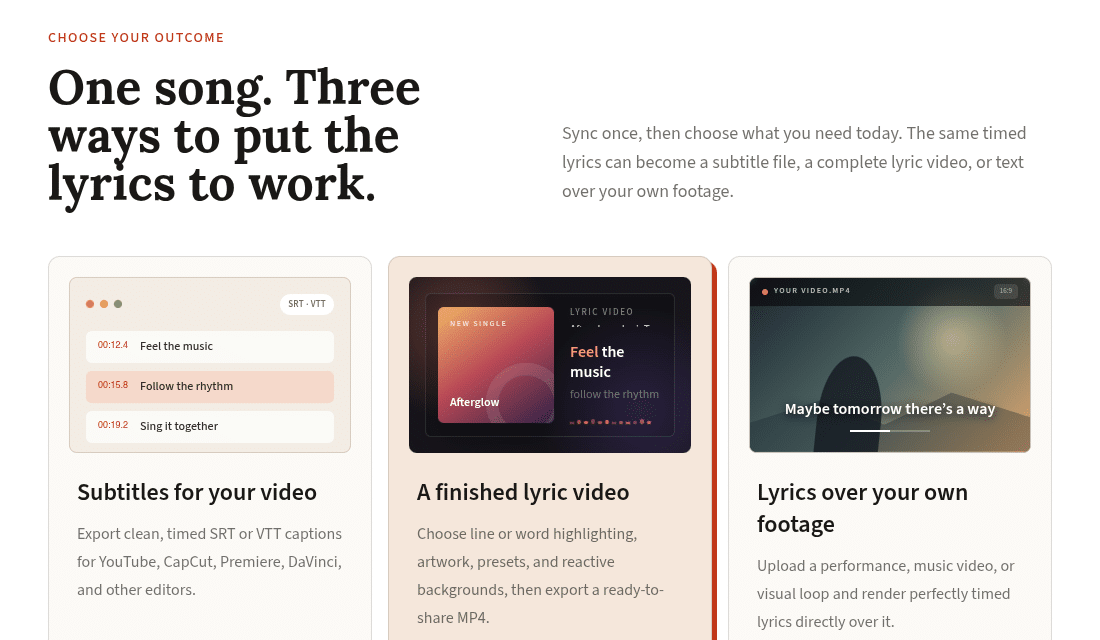
LyricTime: one set of timed lyrics, three outputs
After transcription, lyric lines can be dragged against the waveform on a timeline. A word-level view goes further: any word can be dragged with the scrubber to fine-tune its timing, which helps with fast rap verses and double-time choruses.
Best Fit
The editor previews changes with audio playback. It can split and merge lines, and a quick-find feature jumps to a line after a few typed words. Find and replace is also available.
When the timing is done, LyricTime exports LRC, SRT or VTT. That spread makes it a strong choice for full-song projects that need control at both line and word level, such as karaoke tracks or lyric videos built in another editor. The align mode is especially useful when the lyrics already exist in a document, because the tool only has to place known words instead of guessing them. That usually means less correction on dense or heavily processed vocals.
3. Moises AI Lyrics Transcription
Practice-Focused Word Sync
Moises is built for practice. The user uploads a song from a library or a public URL, and the platform supports several audio and video formats. It separates the track into vocals, drums, guitar, bass and other instruments, and it generates lyrics only when the separation includes a vocal stem.
The transcript uses word-by-word synchronization, and the lyrics can be shown together with the chords in one view. That makes Moises useful for singers, rappers and language learners who want to loop a difficult line until it feels natural. Paid users on web and desktop can also edit the lyrics to correct errors.
The technology has reached professional studios. Universal Audio added lyric transcription powered by Moises to LUNA 3.0 in September 2026, so producers can transcribe lyrics from vocal tracks inside the workstation.
The Export Limitation
There is one important limit for production work. Moises help documentation states that transcribed lyrics are not available to export with the result, and it does not list LRC or SRT files.
Plan limits also apply. On the entry plan, lyrics transcription covers the first minute only, while higher plans remove that limit.
For rehearsal, chord study and language practice, Moises is a strong tool. For karaoke files or subtitle feeds, a second tool is still necessary to produce a timed file. A common pattern is to use Moises to learn and check a song, then build the delivery file in a tool that exports LRC or SRT.
4. Karaoke.io LRC Generator
Broad File Output
Karaoke.io focuses on formats. Its upload page lists MP3, WAV, FLAC, M4A, OGG, MP4 and MOV, and its LRC generator also works with supported song links.
The engine uses Whisper to time every line and word against the actual audio. The output range is wide: standard LRC for music players, Enhanced LRC for word-level highlighting, SRT and VTT for video editors, and ASS for styled karaoke subtitles.
A built-in karaoke player previews the sync before download, so a late chorus or an early ad-lib is easy to spot.
The Editing Trade-Off
Karaoke.io does not describe an in-app timing editor. Its own guidance for word-level LRC is to open the file in a text editor and adjust the timestamps by hand. The text itself can be edited after extraction.
That approach suits bulk work where format range matters more than detailed edits. A karaoke host preparing a set, or a channel that needs subtitle files for many tracks, gets every common format from one upload. Developers who build their own karaoke or lyric display features can also use the standard files as test input, since LRC and SRT are simple text formats that most libraries already parse.
Users who need precise timing should plan for an extra step: export the LRC, then fine-tune it in a dedicated timing editor. For a single release with a tight lyric video, that extra step matters. For a large batch of karaoke files, the speed of one upload usually outweighs it.
5. NotaGen Song to Lyrics
Flexible Ways to Add a Recording
NotaGen accepts audio from many sources. The user can upload MP3, WAV, M4A, AAC, FLAC, OGG, OPUS or AIFF, paste a YouTube or TikTok link and let the tool fetch the audio, record with a microphone, or pick a track from My Library.
After transcription, the lyrics appear as separate lines that can be edited on the page. Each line gets its start time during transcription.
Where Its Timing Controls Stop
NotaGen works at line level. It does not create word-by-word karaoke highlighting, so fast rap or syncopated hooks may need more work in another editor.
The export options are practical. The user can copy the lyrics to the clipboard or download a TXT, LRC or SRT file.
NotaGen describes its result honestly as a draft to check against the recording. Dense mixes, accented vocals and ad-libs usually need a manual pass with any tool. For quick intake from almost any source with basic line timing, NotaGen is a convenient option. It works well for capturing lyrics from a rough phone demo or a rehearsal recording, where the goal is a readable lyric sheet rather than frame-accurate timing. Songwriters who collect ideas in voice memos can use it to turn a pile of rough takes into searchable text, then move the best song into a more precise timing tool later.
6. Kapwing Audio to Subtitles
A Subtitle-First Workflow
Kapwing is a video editor first. Its upload support covers MP3, AAC, M4A, WAV, OGG and FLAC, and its separate transcription tool also accepts a URL from sites such as Vimeo and TikTok.
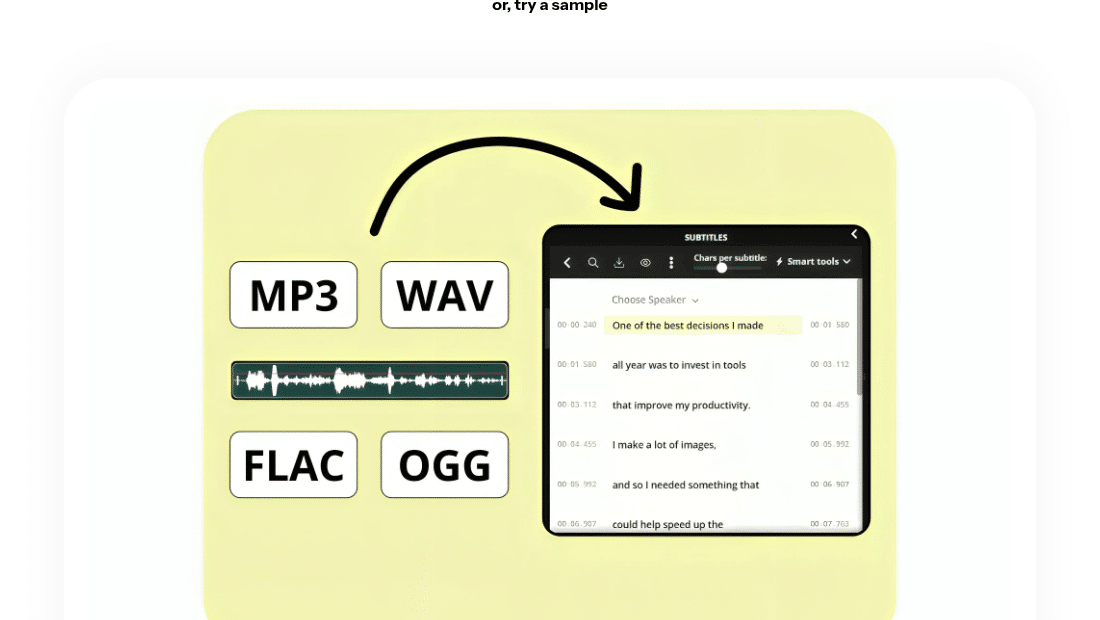
Kapwing: audio in, timed subtitle lines out
After upload, subtitles generate automatically and the Subtitles Editor opens. The user edits the text and timing, splits a caption with the Split button, merges two captions with Merge, and drags the start or end slider to change when a caption appears and disappears.
Best for Video Editors
Exports cover the essentials: SRT, VTT or a TXT transcript. Captions can also be burned directly into the video for social platforms.
Kapwing does not offer LRC export, so it is a weaker fit for music players and karaoke files. For lyrics that need to appear over video on YouTube, Instagram or a live-show backdrop, it keeps transcription, styling and publishing in one place. Creators who already cut their videos in Kapwing avoid moving files between apps, which saves time on short-form clips. Before burning captions in, it is worth reviewing them on a phone-sized preview, since long lyric lines that read well on a desktop can wrap awkwardly on a vertical screen.
Side-by-Side Comparison
| Tool | Input | Output Formats | Can You Edit Timing | Best For |
| Neural Frames | MP3, WAV, M4A, FLAC, OGG | Preview LRC, preview SRT | Line start and end | Timed lyrics that lead into a lyric video |
| LyricTime | MP3 (homepage also lists WAV, M4A) | LRC, SRT, VTT | Line and word | Full-song projects that need detailed timing |
| Moises | Audio or video upload, public URL | No timed export | Text edits on paid plans | Rehearsal and chord study |
| Karaoke.io | MP3, WAV, FLAC, M4A, OGG, song links | LRC, Enhanced LRC, SRT, VTT, ASS | In a text editor after export | Multi-format karaoke and subtitle packs |
| NotaGen | Upload, YouTube or TikTok link, mic, My Library | TXT, LRC, SRT, copy | Line level | Fast intake from any source |
| Kapwing | Audio upload; URL in transcription tool | SRT, VTT, TXT, burned-in captions | Caption start and end | Video-first workflows |
Choosing the Right Lyrics Tool
No single tool wins every job. The best choice depends on where the lyrics go next.
For timed lines that feed a lyric video, Neural Frames is the strongest starting point. For detailed word-level timing across a full song, LyricTime is the closest match. Moises suits practice rather than file delivery, Karaoke.io covers the widest format range, NotaGen accepts the most input sources, and Kapwing fits creators who publish lyrics over video.
Whatever the tool, the same habit saves time: check the first verse and the first chorus by ear before trusting the rest. Sung audio is still harder for AI than speech, and a short review now prevents a re-export later. With clean timing in place, the lyrics are ready for a player, a caption track or a full lyric video.