
Vibe coding has rapidly gained popularity in recent years and is changing the way programming is approached. Traditional lines of code are replaced by a conversational format with artificial intelligence (AI), enabling impressive end-product results. However, the market is broad, so in this article we review several popular vibe coding tools that help achieve high-quality outcomes.
What is Vibe Coding
Briefly put, it is a programming practice based on conversation – no manual coding is required for a creator to build a product, as the work is performed by AI.
In practice, two approaches to this method exist:
- Pure coding – often described as an experimental practice where the user relies almost entirely on AI-generated code. Here an idea is quickly turned into a working prototype, with less attention given to architecture and deep understanding of how the program functions. This approach is best suited for rapid testing or small-scale projects.
- Responsible AI-assisted development – associated with a more professional approach where AI becomes a programming partner. The developer formulates the task but reviews, tests, adjusts, and takes responsibility for the final product. The focus is therefore on quality and reliability, which makes this approach more common in practice.
5 Best Vibe Coding Tools
Below we discuss several high-level vibe coding tools that are becoming indispensable assistants in development projects.
- Base44
An AI application-building platform that allows people without programming knowledge to create mobile applications. The system automatically handles deployment, hosting, data storage, and user authentication.
It is best suited for simple applications such as travel planners, personal finance tools, or note-taking apps.
Moreover, it includes an AI discussion mode, smart AI add-ons (chatbots, prediction and automation tools), automatic infrastructure setup, and an analytics dashboard.
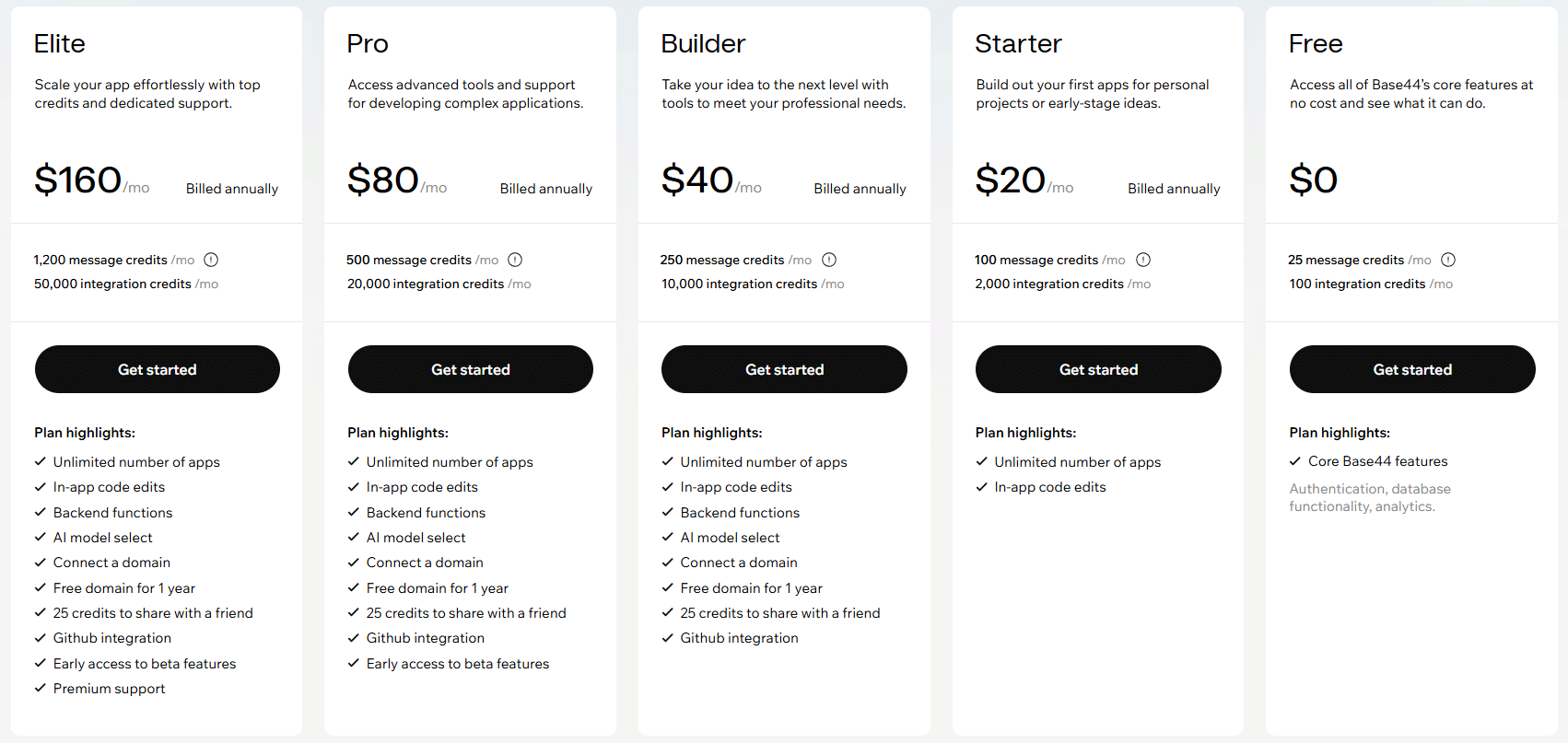
Base44 pricing. Image source: Base44
- Windsurf
Windsurf is designed for professional developers, providing autonomous coding capabilities through its Cascade agent. The system maintains deep context awareness, automatically fixes linter errors, and executes commands through natural language.
It generates code automatically, can restructure it, and supports many popular programming languages. However, it is important to note that the tool depends on an internet connection, and many features rely on cloud services.
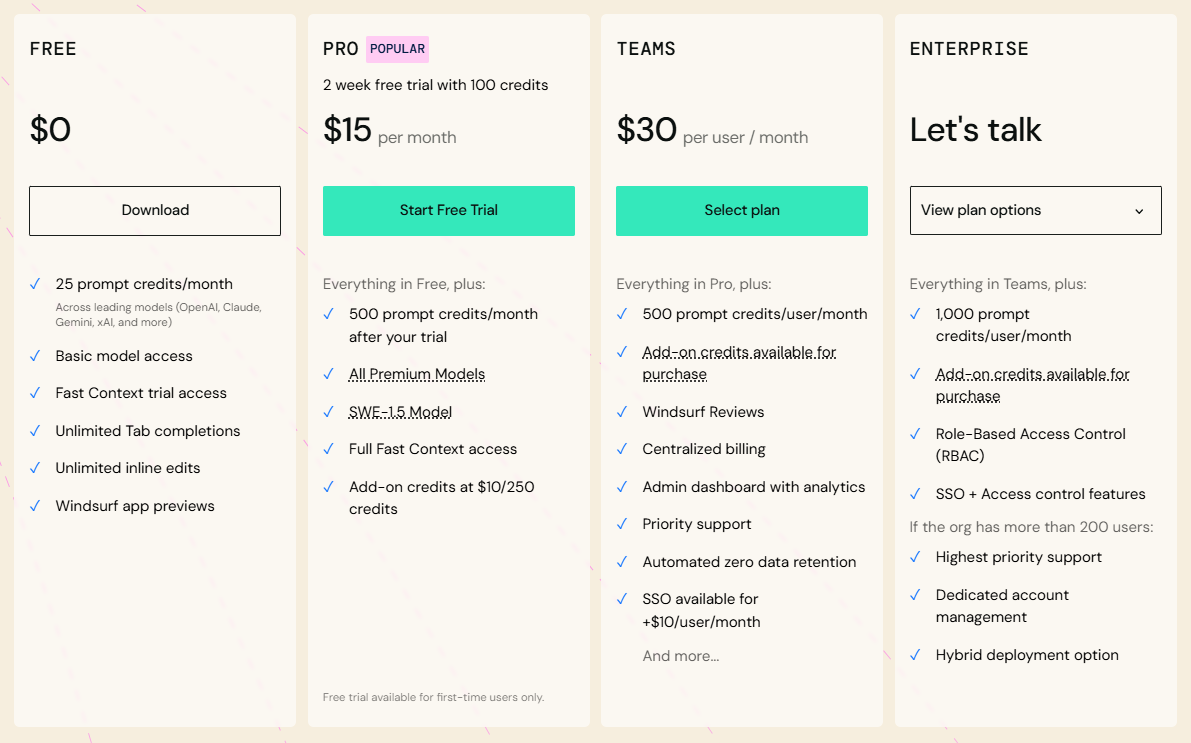
Windsurf pricing. Image source: Windsurf
- Claude Code
This vibe coding tool is primarily intended for managing complex codebases – the system operates through a terminal interface that allows developers to control large projects using natural language commands.
In addition to refactoring, debugging, and codebase exploration, it can analyze log files and detect errors in building scripts or CI pipelines. Agent skills allow workflows (including code review checklists, commit message templates, and debugging procedures) to be saved as reusable functions.
Because the terminal-based workflow requires command-line, Git, and software architecture knowledge, the platform is not suitable for beginners.
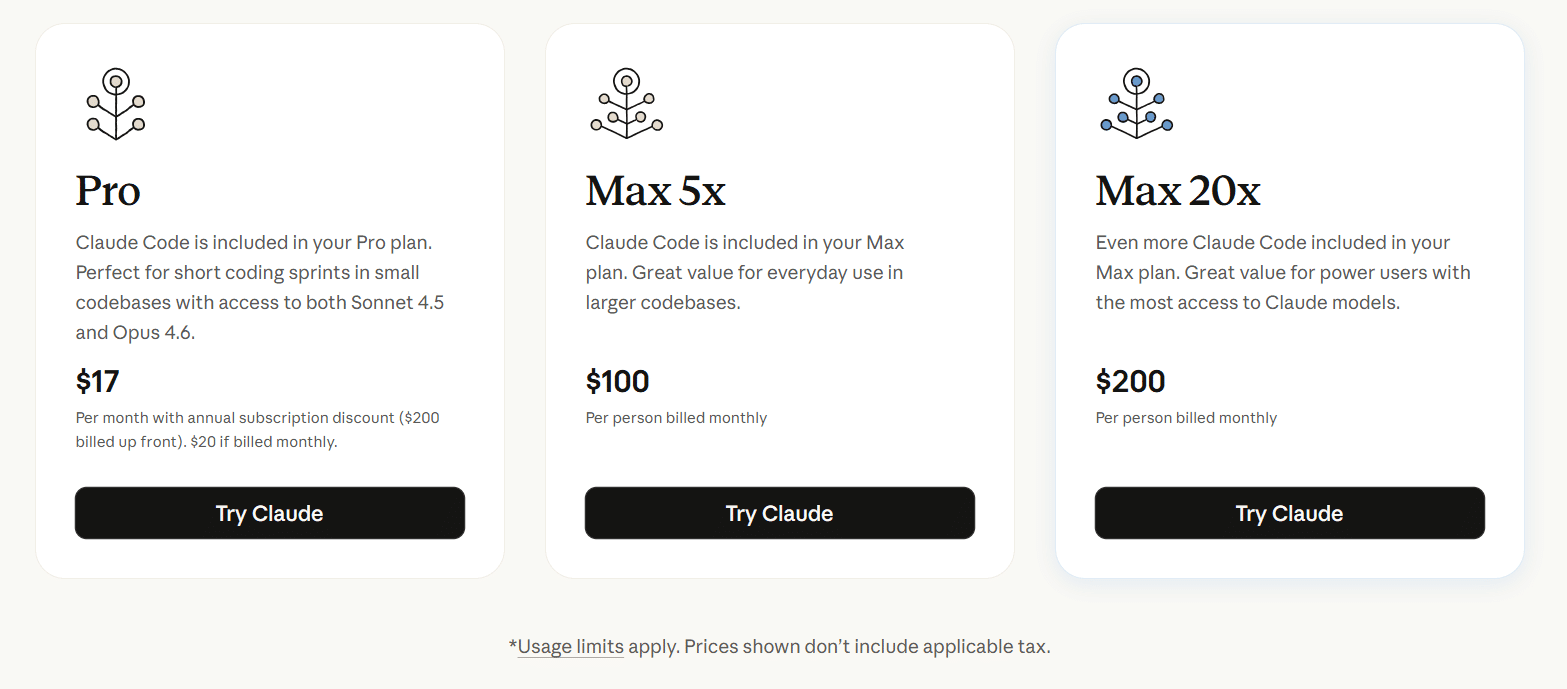
Claude pricing. Image source: Claude
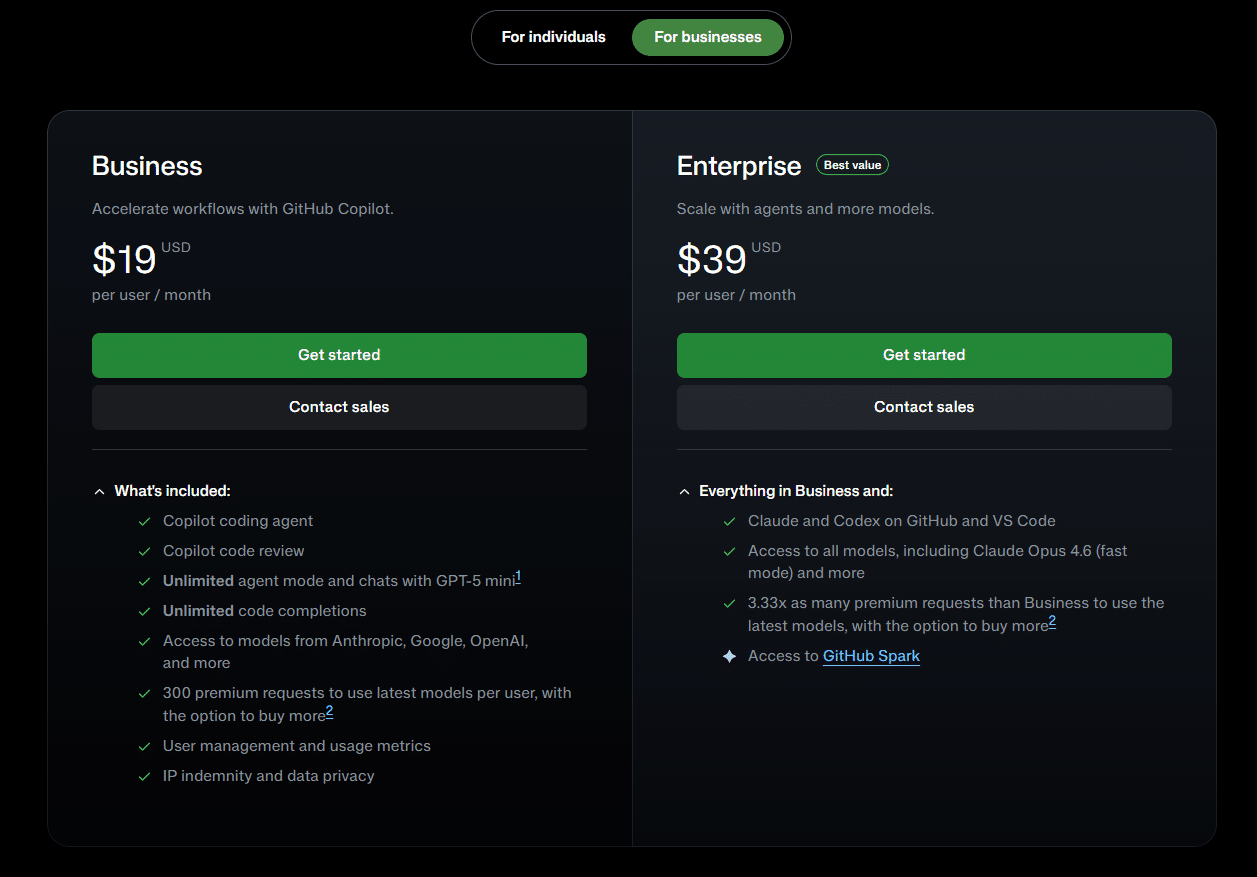
- GitHub Copilot
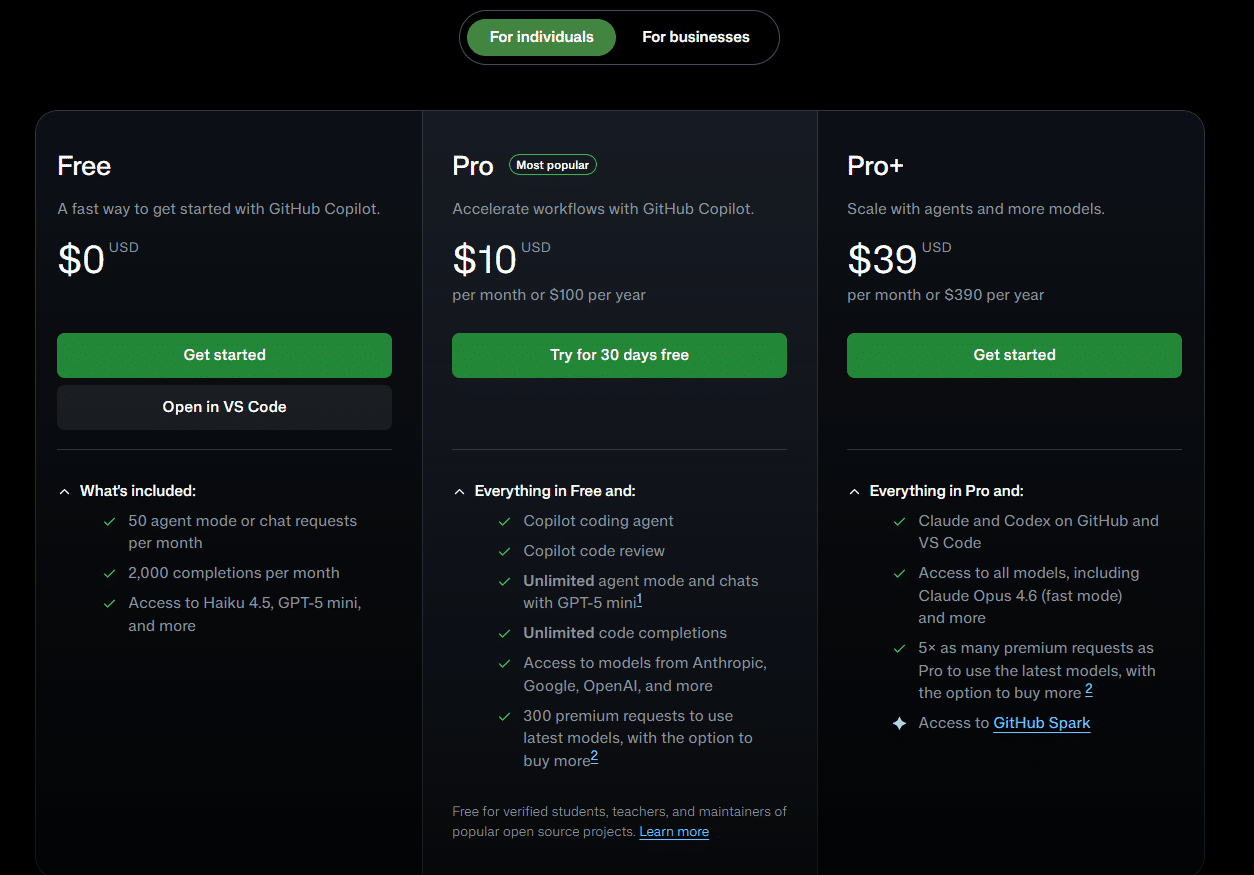
The tool provides broad IDE support, including Visual Studio Code, JetBrains IDEs, Visual Studio, Xcode, Neovim, Eclipse, and more. Agent mode performs autonomous coding tasks and provides suggestions.
It is important to note that GitHub Copilot works as an extension inside an existing editor. The tool is especially suitable for teams already using GitHub, as it ensures smooth integration into established workflows.
GitHub pricing. Image source: GitHub
- Cursor
Cursor brings AI capabilities into an AI-native code editor designed for professional developers. The platform indexes the entire codebase to provide context-aware suggestions, so basic programming knowledge is required.
It can refactor functions, explore unfamiliar code, and automatically generate new functionality. It completes code and, through agent functions, performs requested changes – including editing multiple files.
This vibe coding tool is also quite versatile, supporting Claude, GPT, Gemini, and Grok models, and includes a privacy mode.
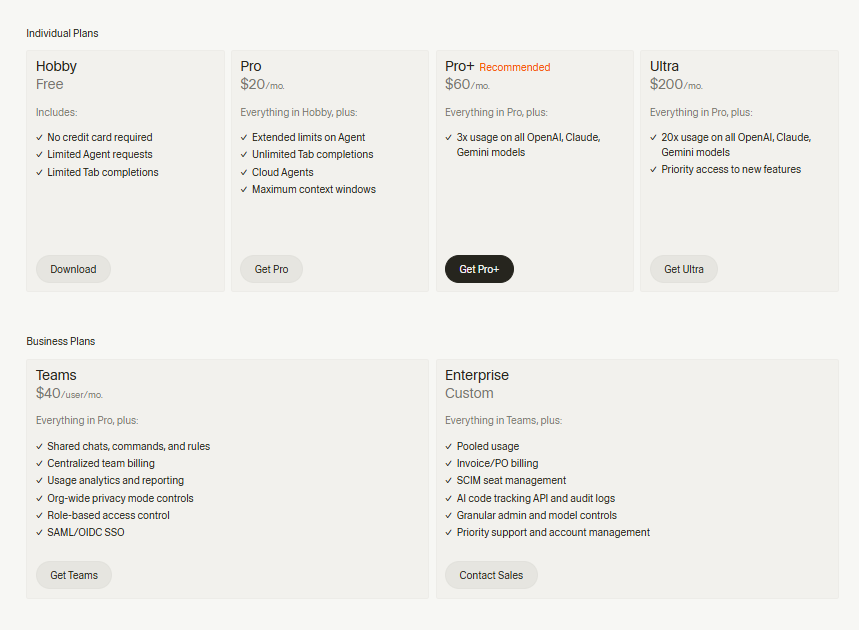
Cursor pricing. Image source: Cursor
How to Choose a Vibe Coding Tool
Choosing the right vibe coding tool primarily depends on the user’s competence and the project stage. Without programming experience, AI app builders are typically selected to quickly produce a working product, while in the MVP validation stage speed and integration become the key factors.
For long-term projects, code ownership and portability are important, so priority is given to solutions that do not restrict infrastructure choices. Professional developers increase productivity with tools like Cursor or Windsurf, Copilot is considered an economical option for daily work, and Claude Code is used for complex refactoring.
Final Thoughts
Overall, vibe coding reflects a broader shift in programming culture, where skills, competencies, and expectations can be met at any stage. This is evident from the wide range of market examples – the tools discussed here represent only a small portion of a rapidly expanding ecosystem.
If you are interested in this topic, we suggest you check our articles:
- Which AI LLM is Best for Vibe Coding?
- AI Coding Assistants: New Generation of Programming Tools That Make Wonders
- AI Coding Assistants Are Getting Smarter. But Which One Actually Helps You Code?
Sources: Base44, Claude, Cursor, Emergent, GitHub, Google Cloud, Lovable, Retool, Windsurf
